The Music tab lives in the same generator as images, video and voiceover: the same composer and the same feed, only instead of an image prompt you describe a song. This is part ten of the AI2Face guide. How the composer and feed work in general is covered in part one — image generation. Here we cover everything about music.
How to open music in AI2Face
There are two ways:
- the Music tab above the input field in the generator;
- Audio in the top bar → Create music.
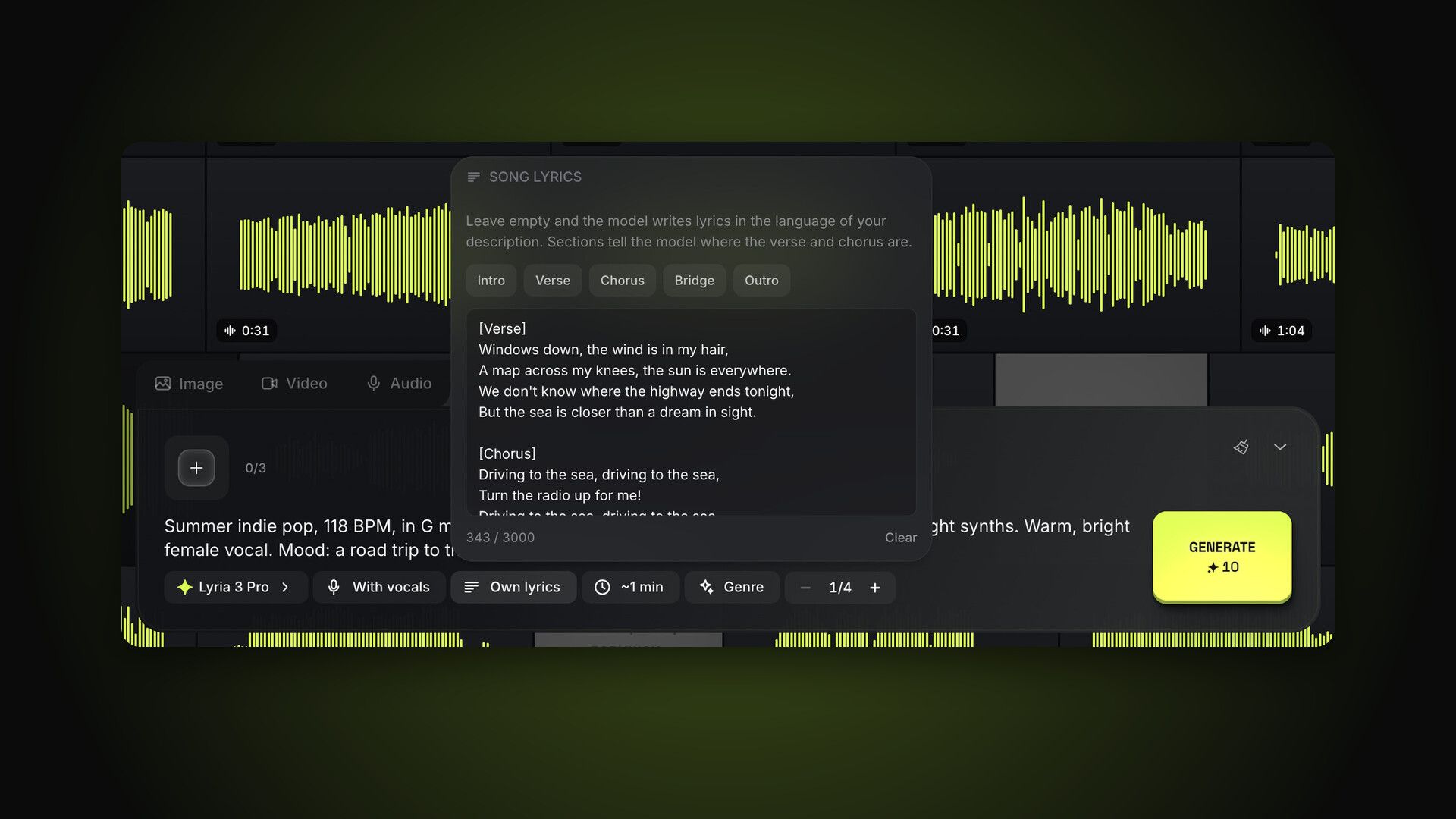
Below the input field, the settings run left to right: model, vocals, song lyrics, length, genre and the number of tracks per run (up to four). The price is shown on the Generate button.
Which model to choose
AI2Face has two Google music models — more about them on the Lyria 3 page.
| Model | Length | When to use it |
|---|---|---|
| Lyria 3 Pro | about 1, 2 or 3 minutes, or Auto | a full song with verses, a chorus and a bridge |
| Lyria 3 Clip | exactly 30 seconds | a jingle, a loop, an intro, background for a short video, testing an idea |
With Clip the length button is dimmed: inside, a note says the model always makes 30 seconds and offers to switch to Lyria 3 Pro. Clip is cheaper, and for both models the price doesn’t depend on length.
How to describe the music
In the input field, describe the genre, instruments, mood, tempo and voice. The more specific, the more accurate the track: “summer indie pop, 118 BPM, acoustic guitar and handclaps, warm female vocal” works better than “a happy song.” The description can be up to 2,000 characters. The language of the description becomes the language of the song.
The Genre button adds a ready-made description to the field: Pop, Rock, Hip-hop, Electronic, Lo-fi, Cinematic, Jazz or Acoustic. It’s a starting point — you can edit and extend it.
Describe the voice by its timbre, not by a singer’s name: the model rejects real artists’ names and well-known song titles. More on writing descriptions in the guide how to make a song with AI.
Vocals or instrumental
The With vocals button switches the mode:
- With vocals — a song with words: your lyrics or lyrics written by the model;
- Instrumental — music without words for backgrounds, videos and games. The lyrics button is hidden in this mode.
How to add your own lyrics
The “Lyrics: auto” button opens the Song lyrics window. Leave the field empty and the model writes the lyrics in the language of your description. Your own lyrics can be up to 3,000 characters; once they’re in, the button reads “Own lyrics.”
The Intro, Verse, Chorus, Bridge and Outro buttons insert section tags into the lyrics. Put backing vocals and echoes in parentheses — the model sings them separately from the main line. How to write and tag lyrics so they sing smoothly is covered in song lyrics with AI.
Song length
For Lyria 3 Pro, the length button offers Auto — the model picks a length that fits the song — or “~1 min,” “~2 min,” “~3 min.” Length is approximate: our “~1 min” tracks came out between 58 and 64 seconds. The price doesn’t depend on length.
Music from an image
The “+” button attaches up to three images or characters — from the feed, your uploads or Characters. The model picks up the setting, mood and details from the image. If the description and lyrics are empty, the track is based on the image alone, in the interface language. That’s how you can make a theme for a comic hero, a song for a vacation photo or music for cover art.
The finished track in the feed
The track lands in the feed in about half a minute, and the composer is free for the next request in the meantime. The track tile shows a waveform and the length, and you can play it right on the tile. The feed’s Type → Audio filter keeps only tracks and voiceovers.
The viewer shows a player with seeking, the description, the lyrics with a Copy button, the model, the vocal mode, the tempo the model detected, the length and the cost. Download saves the MP3, One more generates the track again with the same settings — you’ll get a different melody — and the pencil sends the description and lyrics back to the composer for editing.
Here’s the track from the screenshots:
If the model rejects a request
Lyria won’t sing in real artists’ voices, perform other people’s lyrics or create content that Google’s rules prohibit. If a request is rejected, AI2Face shows the reason and refunds the credits. What to do:
- remove artists’ names and song titles, and describe the style in words;
- replace images showing recognizable people;
- if the reason isn’t clear, rephrase the description — the filter sometimes fires on harmless text too.
Bottom line
For your first song, open Music, click Genre, add a topic and a voice, and run Lyria 3 Clip — that’s the fastest way to hear how the model interprets your description. Make full songs with Lyria 3 Pro and your own lyrics tagged with the section buttons, and switch on Instrumental for video backgrounds. Voiceover is the neighboring tab — see the part on voiceover.
FAQ
How much does a song cost in AI2Face?
The price is per track and depends on the model: Lyria 3 Clip is cheaper than Lyria 3 Pro. It doesn’t depend on the song’s length, lyrics or images, the total is shown on the Generate button, and if a generation fails, the credits are refunded.
How long can a song be?
Lyria 3 Pro makes a song of about 1, 2 or 3 minutes — or picks the length itself in Auto mode. Lyria 3 Clip always gives you 30 seconds.
Can I paste my own lyrics?
Yes, in the Song lyrics window — up to 3,000 characters. The Verse, Chorus and Bridge buttons tag the sections. If the field is empty, the model writes the lyrics in the language of your description.
Which languages can the model sing in?
The model takes the song’s language from the language of the description and lyrics: write in English and it sings in English. In our tests it also sang Russian lyrics in full.
How do I make music without words?
Click With vocals and choose Instrumental. The lyrics window disappears, and the request gets an instruction to play without vocals.
What format is the track downloaded in?
MP3: the Download button in the track viewer. You can also copy the lyrics the model wrote from there.