Turning a drawing into a photo is useful for architects and designers pitching an idea, for creators bringing a character to life, and for parents who want to show a kid their monster “for real”. A model that works with references takes the shape and composition from the drawing and the materials, light and style from the prompt. We tested three typical cases. Every sketch and result was made in the AI2Face generator with Nano Banana Pro.
Sketch to image: what comes from the drawing and what from the prompt
| From the drawing | From the prompt |
|---|---|
| shape and proportions | materials and colors |
| composition, camera angle | light, time of day, weather |
| where the details are | background and surroundings |
| the number of elements: windows, eyes, laces | style: photo, 3D, anime, watercolor |
The cleaner the lines in the drawing, the more accurately the model repeats the shape. The more detailed the prompt, the less the model invents on its own.
A house sketch to a photo
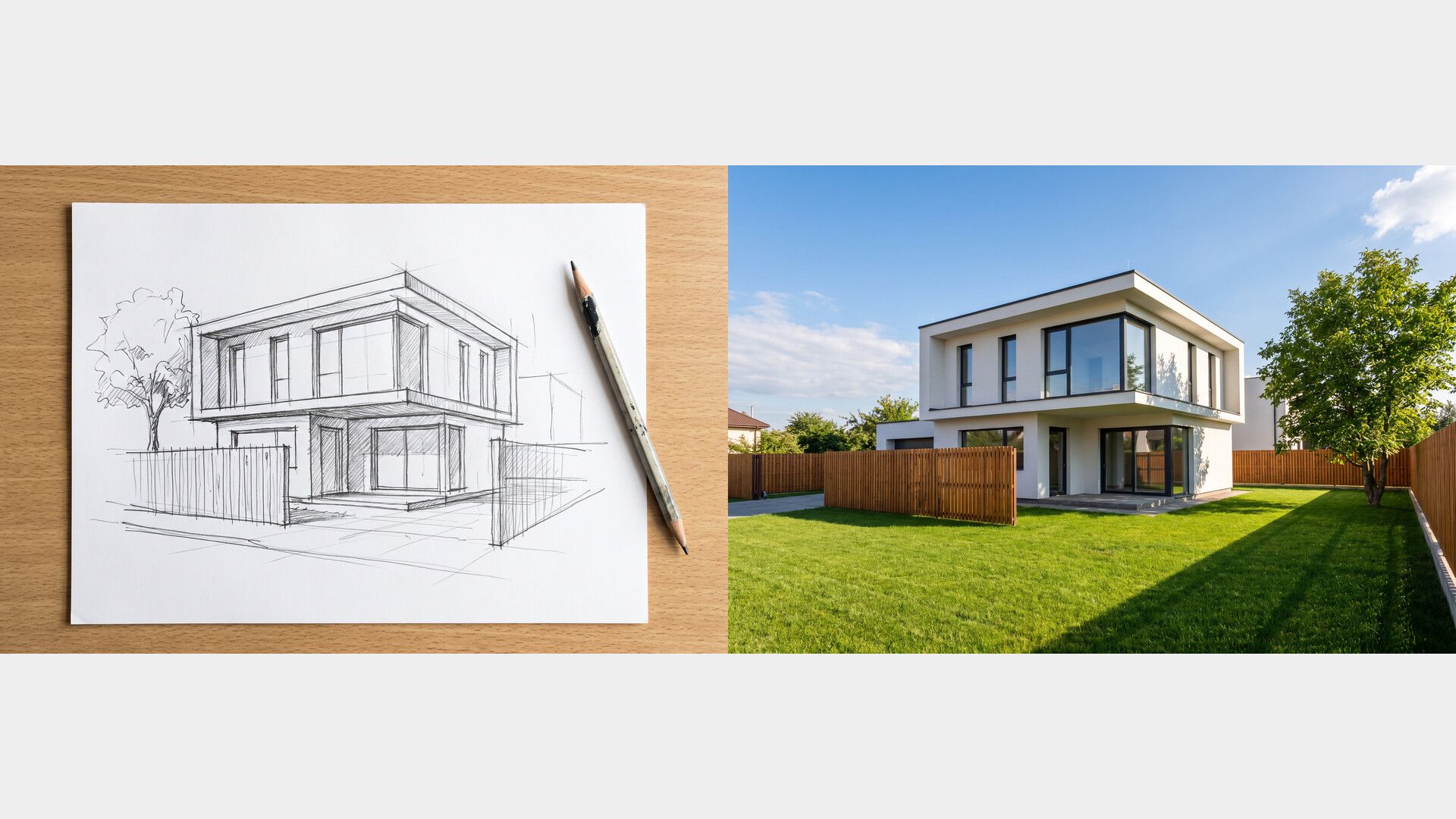
The first drawing is an amateur pencil sketch of a two-storey house with a flat roof, a fence and a tree on the left. The sheet is photographed on a desk next to the pencil. The prompt adds materials, weather and a lens, and asks to keep the layout:
Turn this pencil sketch of a house into a realistic architectural
photograph: the same two-storey modern house with a flat roof, the same
window layout, fence and tree position from the sketch, white plaster walls,
dark aluminium window frames, warm wood fence, green lawn, a sunny afternoon
with a blue sky, shot with a 24mm lens at eye level from the same angle as
the drawing. Only the photo, no paper, no pencil, no desk. No text, no logos.
The model kept every major decision in the sketch: the cantilevered upper floor, the large windows, the fence and the tree on the left. It didn’t turn the loose construction lines into extra details. The angle is close to the sketch but not exact — if it matters, add “exactly the same perspective as the drawing”. For more on sketches in architecture, see our AI architectural design guide.
A sneaker sketch to a product photo
The second drawing is a ballpoint pen sneaker sketch from a sketchbook page: a chunky wavy sole, mesh panels, a heel pull tab. For a designer, it’s a way to show an idea before there’s a prototype.
Turn this ballpoint pen sketch into a realistic studio product photo of the
sneaker: exactly the same shape, sole profile, panels, heel pull tab and
laces as in the drawing, made of off-white mesh with light grey suede
overlays and a cream chunky sole, side view on a seamless light beige
background, soft studio light with a gentle shadow under the sole. Only the
sneaker, no paper. No text, no brand logos.
The sole profile, the panel layout, the heel tab and the lacing match the drawing almost line for line. The materials and colors came from the prompt: mesh, suede, a cream sole. There are no logos — always keep “No brand logos”, or a familiar mark may appear on the shoe. To turn a finished photo into a marketplace listing, see our AI product images for ecommerce guide.
A kid’s drawing to a toy
The third drawing is a crayon monster: orange, round, with three eyes, horns, two teeth and little purple wings. We asked for a plush toy.
Turn this child's crayon drawing into a realistic product photo of a soft
plush toy: the same round orange fluffy monster with three eyes, two tiny
green horns, a wide smile with two white teeth, short brown legs and little
purple felt wings, matching the drawing's shapes and colors. The plush toy
sits on a light wooden shelf, soft daylight, shallow depth of field. Only
the toy, no paper. No text, no logos.
The toy is instantly recognizable: three eyes, two teeth, green horns, purple felt wings and short legs. The model smoothed the wobbly lines of the drawing into a neat shape but kept the monster’s personality. Instead of a plush, ask for a 3D cartoon character, a clay figurine or an animated hero — that’s how a whole character grows out of a doodle; see the AI character generator guide.
Prompts: 6 sketch-to-image tasks
Start the prompt with “Turn this sketch into …” and end with “the same shape and layout as in the drawing”.
Interior sketch to a render.
Turn this sketch of a living room into a realistic interior photo: the same
furniture layout and window positions, Scandinavian style, light oak floor,
linen sofa, soft daylight. The same perspective as the drawing.
Fashion sketch to a photo on a model.
Turn this fashion sketch into a realistic photo of a model wearing the
dress: the same silhouette, neckline and length as in the drawing, emerald
silk, studio light, plain grey background.
Character drawing to a 3D cartoon.
Turn this drawing into a 3D animated character render: the same proportions,
outfit and colors as in the drawing, soft cartoon lighting, simple pastel
background.
Landscape sketch to a photo.
Turn this rough landscape sketch into a realistic photo: the same mountains,
lake and path as in the drawing, golden hour light, light mist over the
water.
Logo sketch to clean artwork.
Turn this hand-drawn logo sketch into clean flat vector-style artwork: the
same shapes and composition, two colors, white background. No extra text.
Drawing to anime.
Turn this pencil drawing into a colored anime illustration: the same pose
and composition, clean line art, soft cel shading.
The opposite task — turning a photo into a drawing — is covered in our guide on how to turn a photo into a drawing.
What kind of drawing works best
- Clear outlines. The model may read faint lines and heavy hatching as shadows or texture.
- One object or a clear scene. Crop several sketches on one sheet into separate images.
- Even light on the photo of the sheet, with no shadow from your hand or phone.
- Shot from directly above, with no strong paper perspective — otherwise the drawing’s proportions get distorted.
- Labels on the drawing may carry into the result — remove them or add “No text”.
- Color in the drawing is taken into account: if colors matter, color it in or name them in the prompt.
Limitations
- Angle. The model may shift the viewpoint slightly — ask for “exactly the same perspective”.
- Technical drawings. The model doesn’t keep dimensions the way CAD does: the result is an illustration, not engineering documentation.
- Fine details thinner than a pen line may get simplified or reinvented.
- Brand look-alikes. A sketch of a shoe, bag or car may end up resembling a well-known model — check the result and never use someone else’s logo.
Bottom line
Sketch to image AI turns a drawing into a photo in one generation: the drawing sets the shape and composition, the prompt sets the materials, light and style. In our test Nano Banana Pro kept the house’s window layout, the sneaker’s sole profile and every feature of the kid’s monster. Start the prompt with “Turn this sketch into …”, ask for “the same shape and layout”, describe the materials and add “No text, no logos”. Drawings become photos, 3D renders and anime in the AI2Face generator, with the cost shown before each run; for other edits from a reference, see our image to image AI guide.
FAQ
How do I turn a drawing into a photo with AI?
Photograph or scan the drawing, upload it to a model that works with references, such as Nano Banana Pro, and write: “Turn this sketch into a realistic photo: the same shape and layout as in the drawing”, followed by the materials, light and background.
Do I need a prompt, or is the sketch enough?
You need a prompt. The sketch sets the shape but doesn't say what the object is made of or what light it's shot in. Without a description the model guesses the materials — often not the way you intended.
Can AI turn a kid's drawing into a toy?
Yes. In our test a crayon drawing of an orange three-eyed monster became a photo of a plush toy: the eyes, horns, teeth and wings all carried over. The same approach makes a 3D character or a figurine.
Will the composition of the drawing be kept?
Yes, if you ask for “the same layout” and “from the same angle as the drawing”. In the house test the model kept the flat roof, the window layout, the fence and the tree on the left.
Can I do sketch to image for free?
Yes. AI2Face gives you welcome credits when you sign up — enough for several 2K versions. The cost is shown before you start, and the service adds no watermark.
Sources
2
- https://blog.google/innovation-and-ai/products/nano-banana-pro/
- https://ai.google.dev/gemini-api/docs/image-generation