把画稿变成照片,建筑师和设计师可以拿它向客户展示想法,创作者可以让角色活过来,家长也可以让孩子看到自己的怪物“变成真的”。能用参考图的模型从画稿里取形状和构图,从提示词里取材质、光线和风格。我们测了三种常见情况。每张草图和每张结果都在 AI2Face 生成器里用 Nano Banana Pro 完成。
草图转图片:哪些来自画稿,哪些来自提示词
| 来自画稿 | 来自提示词 |
|---|---|
| 形状和比例 | 材质和颜色 |
| 构图、拍摄角度 | 光线、时段、天气 |
| 细节的位置 | 背景和周围环境 |
| 元素数量:窗户、眼睛、鞋带 | 风格:照片、3D、动漫、水彩 |
画稿的线条越干净,模型还原形状就越准。提示词写得越细,模型自由发挥的就越少。
房屋草图变成照片
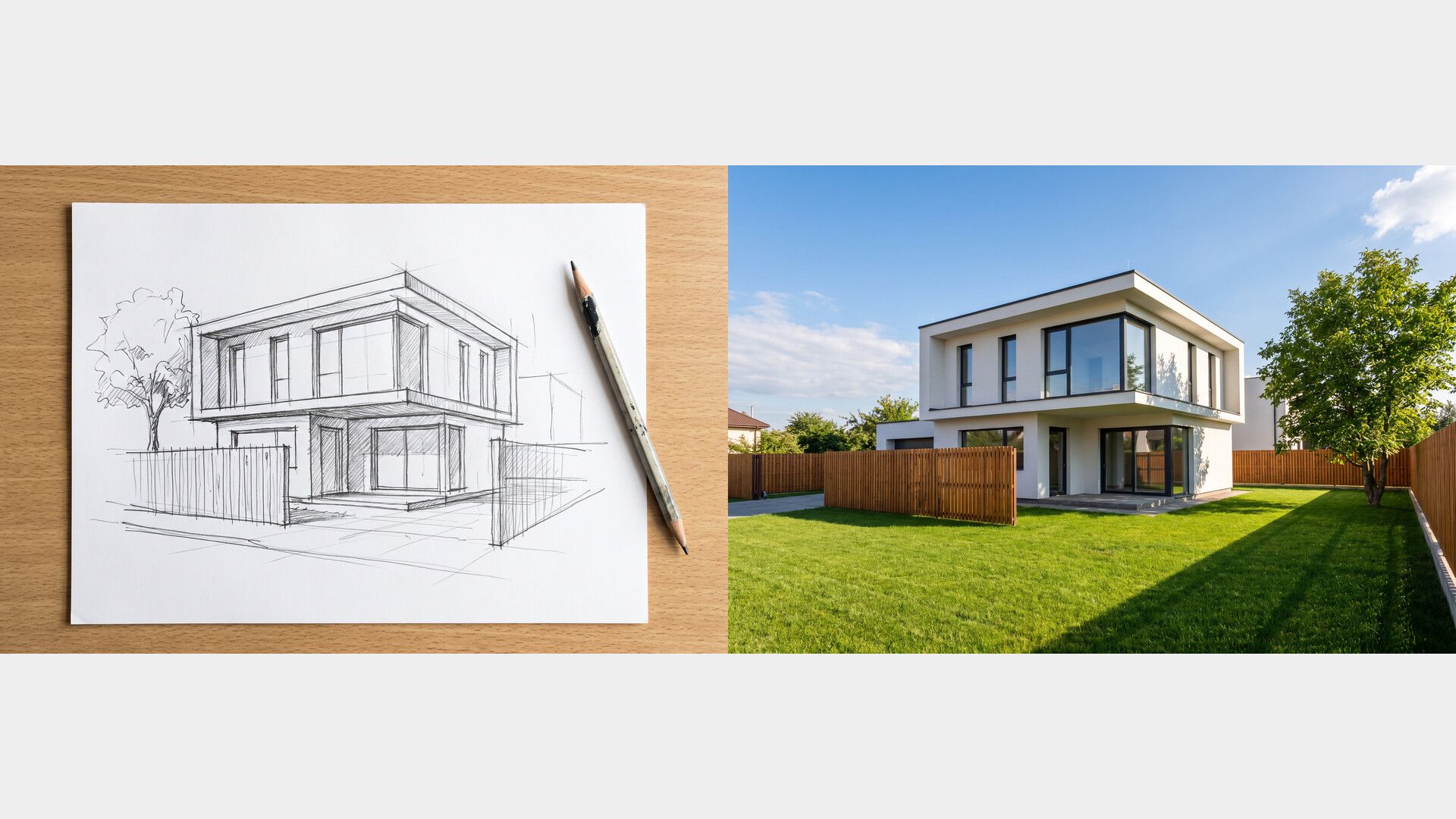
第一张是随手画的铅笔草图:一栋两层平顶的房子,有围栏,左边一棵树。照片里,纸放在桌上,旁边是一支铅笔。提示词补上材质、天气和镜头,并要求布局跟草图一致:
Turn this pencil sketch of a house into a realistic architectural
photograph: the same two-storey modern house with a flat roof, the same
window layout, fence and tree position from the sketch, white plaster walls,
dark aluminium window frames, warm wood fence, green lawn, a sunny afternoon
with a blue sky, shot with a 24mm lens at eye level from the same angle as
the drawing. Only the photo, no paper, no pencil, no desk. No text, no logos.
草图上的几处关键都在:悬挑的二层、大窗户、围栏,还有左边的树。模型没有把松散的辅助线画成多余细节。视角和草图接近,但并不完全一致。如果这一点要紧,加上“exactly the same perspective as the drawing”。建筑草图的更多做法,见 AI建筑设计 指南。
运动鞋草图变成商品照片
第二张是速写本上的圆珠笔草图:波浪形厚底、网布鞋片、后跟提带。设计师可以在样品做出来之前,先用它把想法给人看。
Turn this ballpoint pen sketch into a realistic studio product photo of the
sneaker: exactly the same shape, sole profile, panels, heel pull tab and
laces as in the drawing, made of off-white mesh with light grey suede
overlays and a cream chunky sole, side view on a seamless light beige
background, soft studio light with a gentle shadow under the sole. Only the
sneaker, no paper. No text, no brand logos.
鞋底轮廓、鞋面分片、后跟提带和系带,和画稿几乎逐线一致。材质和颜色来自提示词:网面、麂皮、奶油色鞋底。画面里没有标志。一定保留“No brand logos”,否则鞋上可能出现眼熟的标志。把成品照片做成电商图,见 AI生成商品图 指南。
儿童画变成玩具
第三张是蜡笔怪物:橙色、圆身体、三只眼睛、角、两颗牙,还有一对小的紫色翅膀。我们要求做成毛绒玩具。
Turn this child's crayon drawing into a realistic product photo of a soft
plush toy: the same round orange fluffy monster with three eyes, two tiny
green horns, a wide smile with two white teeth, short brown legs and little
purple felt wings, matching the drawing's shapes and colors. The plush toy
sits on a light wooden shelf, soft daylight, shallow depth of field. Only
the toy, no paper. No text, no logos.
这只玩具一眼就能认出来:三只眼睛、两颗牙、绿色的角、紫色毛毡翅膀和短腿。模型把画里歪扭的线条收成了整齐的外形,怪物的性格还在。不想要毛绒玩具,可以改成 3D 卡通角色、黏土人偶或动画主角——涂鸦就是这样长成一个完整角色的。详见 AI角色生成 指南。
提示词:6 个草图转图片任务
提示词以“Turn this sketch into …”开头,以“the same shape and layout as in the drawing”结尾。
室内草图转效果图。
Turn this sketch of a living room into a realistic interior photo: the same
furniture layout and window positions, Scandinavian style, light oak floor,
linen sofa, soft daylight. The same perspective as the drawing.
时装草图变成模特穿着的照片。
Turn this fashion sketch into a realistic photo of a model wearing the
dress: the same silhouette, neckline and length as in the drawing, emerald
silk, studio light, plain grey background.
角色画转 3D 卡通。
Turn this drawing into a 3D animated character render: the same proportions,
outfit and colors as in the drawing, soft cartoon lighting, simple pastel
background.
风景草图转照片。
Turn this rough landscape sketch into a realistic photo: the same mountains,
lake and path as in the drawing, golden hour light, light mist over the
water.
标志草图转成干净的图形。
Turn this hand-drawn logo sketch into clean flat vector-style artwork: the
same shapes and composition, two colors, white background. No extra text.
画稿转动漫。
Turn this pencil drawing into a colored anime illustration: the same pose
and composition, clean line art, soft cel shading.
反过来,怎样把照片画成图画,见 照片转手绘 指南。
什么样的画稿效果最好
- 轮廓要清楚。 模型可能把淡线和密集排线读成阴影或纹理。
- 一个物体,或一个清楚的场景。 同一张纸上有好几幅草图时,裁成单独的图片。
- 拍纸时光线均匀, 不要有手或手机投下的影子。
- 从正上方拍, 纸面不要有明显透视,否则画稿的比例会被拍歪。
- 画上的标注 可能被带进结果。擦掉,或加上“No text”。
- 画稿里的颜色会被算进去。 颜色要紧,就给画稿上色,或在提示词里写明。
局限
- 视角。 模型可能把视角稍微挪开一点。要求“exactly the same perspective”。
- 工程图。 模型不会像 CAD 那样保住尺寸:出来的是示意图,不是工程图纸。
- 比笔线更细的细节 可能被简化,或被重新画过。
- 容易撞款。 鞋、包或汽车的草图,结果可能长得像某个知名款。核对结果,也不要使用别人的标志。
总结
草图转图片一次生成就能把画稿变成照片:画稿定形状和构图,提示词定材质、光线和风格。我们的测试里,Nano Banana Pro 保住了房子的窗户布局、运动鞋的鞋底轮廓,以及孩子那只怪物的每一个特征。提示词以“Turn this sketch into …”开头,要求“the same shape and layout”,写上材质,并加上“No text, no logos”。在 AI2Face 生成器里,画稿可以变成照片、3D 渲染和动漫,每次费用在开始前显示。其他按参考图来改的做法,见 图生图AI 指南。
常见问题
怎样用AI把一幅画变成照片?
把画稿拍照或扫描,上传到能用参考图的模型,例如 Nano Banana Pro,写上“Turn this sketch into a realistic photo: the same shape and layout as in the drawing”,后面再写材质、光线和背景。
要写提示词,还是草图就够了?
必须写。草图定下形状,但没说物体用什么材料、在什么光线下拍摄。没有描述时,模型会自己猜材质,结果常常不是你要的。
AI能把儿童画变成玩具吗?
能。我们的测试里,一幅橙色三眼怪物的蜡笔画变成了毛绒玩具照片:眼睛、角、牙齿和翅膀都留了下来。同样的做法也可以做成3D角色或手办。
画稿的构图会保留吗?
会,只要写上“the same layout”(同样的布局)和“from the same angle as the drawing”(与画稿同一角度)。房屋测试里,模型保住了平屋顶、窗户布局、围栏和左边的树。
可以免费做草图转图片吗?
可以。AI2Face 注册时赠送欢迎积分,够生成几张 2K。费用在开始前显示,成图不加水印。
资料来源
2
- https://blog.google/innovation-and-ai/products/nano-banana-pro/
- https://ai.google.dev/gemini-api/docs/image-generation