A caricature from a street artist costs money and time, and the result depends on who’s holding the marker. An AI caricature from a photo takes about a minute, and you can redo it as many times as you like. To show exactly what each part of the prompt changes, we took one fictional person and ran him through everything: subtle to grotesque exaggeration, five styles, a job-and-hobbies caricature and a couple caricature. Every image was made in the AI2Face generator.
Friendly vs satirical caricature: what’s the difference
| Friendly caricature | Satirical caricature | |
|---|---|---|
| Tone | warm, the person likes it | sharp, it can sting |
| Exaggeration | subtle or medium | strong, grotesque |
| Where you see it | gifts, office parties, avatars | newspapers, magazines, politics |
| What to write in the prompt | friendly caricature, big head small body | grotesque, satirical, editorial cartoon |
People search for “photo to caricature” and “caricature maker” with the same goal: a funny portrait where the person is still easy to recognize. Models understand both tones, and you set the tone with the exaggeration level.
How to make an AI caricature from a photo: 3 steps
- Upload a portrait as a reference: face close up, front-facing, even light.
- Name 2–3 features to exaggerate: eyebrows, nose, grin, hairstyle. Pick the feature friends would recognize the person by.
- Lock the key traits: “keep the glasses, beard and receding hairline exactly as in the photo.” Without this line, the model draws someone who looks similar instead of the person in the photo.
A handy formula for an AI caricature prompt: exaggeration level + features + traits to keep + style + scene + “no signature.” The scene is what makes a caricature personal: a bicycle, a guitar, a cup of coffee.
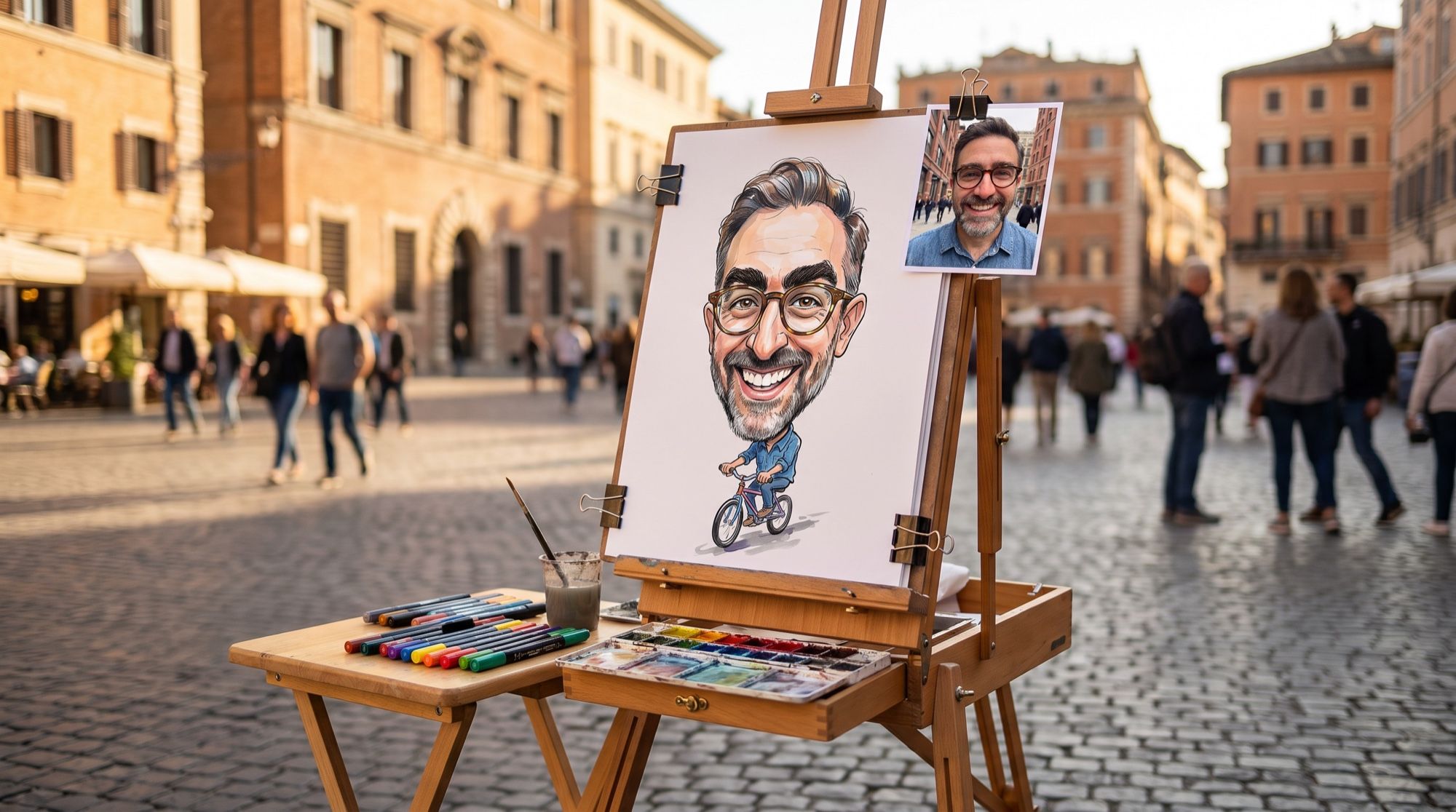
The source for every example is a portrait of a fictional man with bushy eyebrows, a big nose and a wide grin:
How much to exaggerate: subtle, medium and grotesque
We changed only one part of the prompt: the exaggeration level. Style, traits and background stayed the same.
| Level | What to write | What you get | Best for |
|---|---|---|---|
| Subtle | light exaggeration, head slightly larger | a smiling portrait with punchier features | an avatar, a card for a colleague |
| Medium | big head on a small body, eyebrows twice as thick | a classic street-artist caricature | a gift, an office party |
| Grotesque | huge head on a tiny body, giant nose | a satirical caricature, funny but it can offend | friends with a sense of humor |
Even the grotesque version is easy to recognize because the glasses and beard survived. That’s why the traits you lock in the prompt matter more than the exaggeration level.
Caricature styles: prompts and examples
Street artist caricature (markers and watercolor)
The most recognizable style — the kind you get at a boardwalk or a fair.
Turn this photo into a classic street artist caricature drawn with markers
and watercolor on white paper: big head on a small body, exaggerate the bushy
eyebrows, the hooked nose and the wide toothy grin, keep the round tortoiseshell
glasses, the salt-and-pepper beard and the receding hairline exactly so the man
is instantly recognisable. Loose confident ink outlines, bright watercolor
fills, he rides a small bicycle. No text, no signature.
Cartoon-style caricature: a 3D figurine
A bobblehead-style figurine is the go-to cartoon caricature. It works well as an avatar or in a sticker pack.
Turn this photo into a 3D animated movie style caricature figurine: a big
bobblehead on a small body, soft clay-like materials, glossy eyes, exaggerated
bushy eyebrows, a big hooked nose and a huge friendly grin. Keep the round
tortoiseshell glasses, salt-and-pepper beard and denim shirt. Standing on a
simple round base, soft studio lighting, plain pastel blue background.
For more cartoon looks, from 2D to claymation, see our guide to creating a cartoon with AI.
Newspaper caricature in ink
A black-and-white drawing with cross-hatching and a single color accent. The word “friendly” in the prompt keeps the tone in check: without it, the model can make the face look mean.
Turn this photo into a satirical newspaper caricature in black ink: bold
confident brush lines, cross-hatching for shadows, high contrast, one accent
color only (red) on the tie. Big head, small body in a suit, he proudly holds
a giant coffee mug like a trophy. Friendly, not offensive. Off-white newsprint
paper texture. No text, no letters, no speech bubbles, no signature.
In the newspaper style, “no text, no letters, no speech bubbles” is a must. Otherwise the model adds a headline or a speech bubble full of typos.
Job-and-hobbies caricature
A popular format for gifts and office parties: the person with a big head at their workplace, surrounded by their hobbies. The more specific the props, the more the caricature feels like that person.
Create a fun caricature of this man about his job and hobbies: a big head on a
small body, exaggerated bushy eyebrows, hooked nose and wide grin. He is a
barista behind a tiny espresso bar, wearing a brown apron, juggling coffee
cups, a road bicycle leaning on the counter and an acoustic guitar on his back.
Bright colorful digital illustration, clean white background.
Stick to one job and 2–3 props. With more, the image gets crowded and small details start to blur together.
Couple caricature from two photos
For a couple or friends, upload each portrait as a separate photo and split the traits in the prompt: “the man from the first photo — glasses and beard; the woman from the second — red ponytail and gap-toothed smile.” According to Google, Nano Banana Pro keeps the resemblance of up to five people and accepts up to 14 reference images.
Even if both people are in one group photo, crop each of them out separately: faces in group shots are small, and the resemblance drops. To put people from different photos into one scene without the caricature, see our guide to merging photos with AI.
Which AI draws a better caricature: Nano Banana Pro or GPT Image 2.5
We sent the street-artist prompt with the same source photo to Nano Banana Pro and GPT Image 2.5:
| Nano Banana Pro | GPT Image 2.5 | |
|---|---|---|
| Exaggeration | bold: eyebrows, nose, tiny body | cautious: the face stays close to the photo |
| Key traits | glasses, beard and receding hairline kept | glasses and beard kept, receding hairline lost |
| Rendering | light marker work, lots of white paper | dense watercolor, a detailed bicycle |
| Use it for | a classic caricature or grotesque | a gentle caricature where the portrait matters |
For caricatures, we’d go with Nano Banana Pro: it follows exaggeration cues and doesn’t drop the key traits. GPT Image 2.5 is the better choice if the person worries about an “unflattering” caricature, since the face stays close to a portrait.
What photo works best for a caricature
- Front-facing or a slight turn. In profile, the model can’t see the width of the face and gets the proportions wrong.
- A sharp face, close up. If the shot is blurry or tiny, upscale it with AI first.
- Even daylight. Hard flash shadows turn into wrinkles and blotches.
- A real expression. A grin or surprise gives the caricature character; a neutral face gives a dull result.
- No sunglasses or masks. The eyes carry most of the likeness. Keep regular glasses on — they’re a trait.
- No beauty filters. Smoothed skin gives a plastic face with no character.
Why the caricature doesn’t look like the person, and how to fix it
| Problem | Cause | Fix |
|---|---|---|
| Doesn’t look like the person | too much exaggeration | drop to medium, list 3–4 key traits |
| Creepy, uncanny face | realistic style + grotesque | switch to a drawn style: markers, ink, 3D cartoon |
| The wrong feature is exaggerated | the model picked it | name the features: “brows, nose, grin” |
| Glasses or beard disappeared | they’re not in the prompt | add “keep the glasses and beard exactly” |
| A signature or text in the corner | models love to sign their work | add “no text, no signature” |
| Extra fingers | tiny hands on a tiny body | hide the hands in the scene: handlebars, a mug, pockets |
If the caricature still doesn’t look right after two rounds of edits, switch the source photo. A new photo helps more often than the tenth version of the prompt.
A caricature as a gift: printing and ideas
- For a framed print, generate in 4K at 4:5 or 3:4. Our 4:5 image at 2K is 1856×2304 pixels, about 200 dpi on a Letter or A4 sheet. A crisp marker outline on A4 needs 300 dpi, i.e. 2480×3508.
- For a mug or a T-shirt, use a caricature on a white background: it’s easier to cut out. To make the background transparent, see our guide to removing backgrounds with AI.
- For a sticker pack, generate 4–6 expressions of the same caricature: laughing, surprised, thumbs-up. Step by step — in our guide to AI stickers.
- Add names and greetings in an editor: the model may misspell a name on the image.
- Scene ideas: a colleague with their work tools, the boss as a superhero with a coffee mug, a friend with their hobby, a couple with a shared passion, a pet caricature of a dog or cat using the same exaggeration rules.
A dozen more funny looks from your own selfie are in our collection of funny AI prompts.
Limitations
- Likeness isn’t guaranteed. The stronger the exaggeration, the higher the risk of losing the person. Make 2–3 versions and pick the best.
- Small details. Clothing patterns, jewelry and lettering may be redrawn the model’s own way.
- Hands. Fingers on a small body come out worse; check them before printing.
- Other people’s photos. Draw yourself or people who agree to it. A grotesque caricature of a colleague made without asking can easily hurt, and a recognizable face is still that person’s likeness.
Where to make an AI caricature
In AI2Face, Nano Banana Pro and GPT Image 2.5 sit in the same generator, so you can send one photo to both models and keep the better caricature. The cost of every generation is shown before you run it, and credits from packs don’t expire. When you download an image, AI2Face replaces the AI metadata with regular camera data, so social networks don’t label the picture as AI-generated. If you want a drawing from a photo without exaggeration, see our guide to turning a photo into a drawing.
Bottom line
An AI caricature takes a minute if the prompt has three things: 2–3 features to exaggerate, the traits that must stay untouched, and a style. For a classic caricature or grotesque, use Nano Banana Pro — it exaggerates boldly and keeps the glasses and beard. For a gentle caricature where the portrait matters, GPT Image 2.5 is a good fit. If the caricature doesn’t look like the person, dial down the exaggeration or switch the photo, and generate in 4K for a framed print.
FAQ
How do I make an AI caricature from a photo?
Upload a portrait to the generator and say which 2–3 features to exaggerate, which traits to keep and what style to use: “big head, small body, exaggerate the eyebrows and grin, keep the glasses and beard, markers and watercolor.” Nano Banana Pro returns a caricature in 20–60 seconds.
What's the difference between a friendly caricature and a satirical one?
A friendly caricature is a gift-style exaggeration that the person actually likes. A satirical caricature goes further: grotesque proportions and a sharper tone, like an editorial cartoon. AI models draw both; the difference comes from the exaggeration level and the tone you set in the prompt.
What if the caricature doesn't look like me?
Dial the exaggeration down and list the traits that must not change: glasses, beard, hairstyle, a mole. If that doesn't help, use a sharper front-facing photo and generate 2–3 versions.
Can I make a couple caricature from two photos?
Yes. Upload both portraits and say who comes from which photo and what each person's key traits are. According to Google, Nano Banana Pro keeps the resemblance of up to five people in one image.
Can I make an AI caricature for free?
Yes, a few. AI2Face gives you starter credits when you sign up, and the cost of every generation is shown before you run it.
Sources
3
- https://blog.google/innovation-and-ai/products/nano-banana-pro/
- https://ai.google.dev/gemini-api/docs/image-generation
- https://developers.openai.com/api/docs/models/gpt-image-2.5-sunburst