







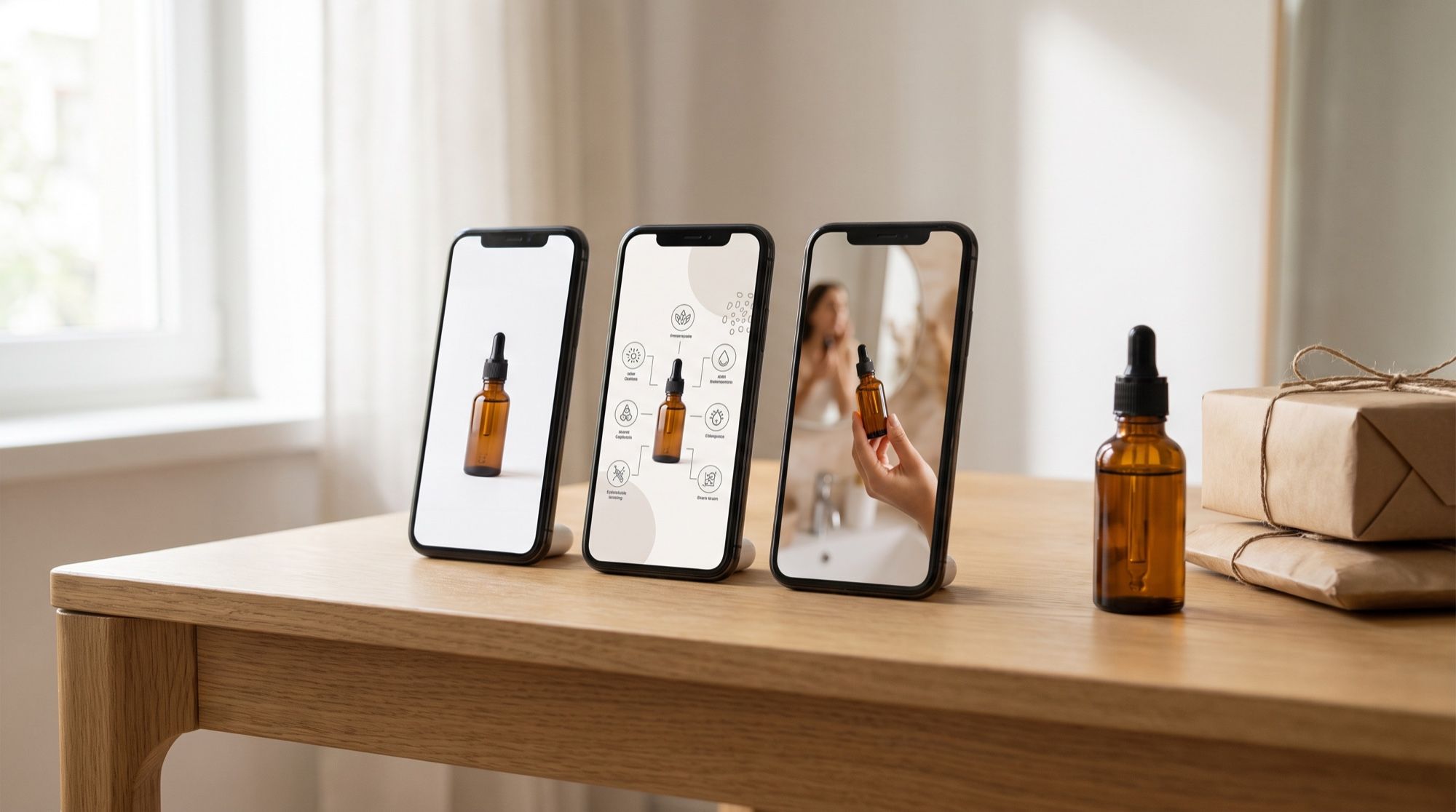
Roundups of “30 AI tools for sellers” list services but don’t show which one handles a specific listing image best. We started from the task instead: we took one product — a serum bottle shot on a phone in a bathroom — and turned it into a hero shot, an infographic, a photo with a person and a seasonal background. We sent the same infographic prompt to three models to compare the results side by side. This article covers visuals only: descriptions and review replies are a job for text models and a separate topic.
1. Which seller tasks AI can handle
| Task | What you get | Which model |
|---|---|---|
| Hero shot | the product on white from an amateur snapshot | Nano Banana 2, for complex backgrounds Nano Banana Pro |
| Infographics and dimensions | a slide with a headline, benefits, dimension lines | GPT Image 2.5 |
| Product in an interior | the product in use at home, in an office, outdoors | Nano Banana 2 |
| Product on a person, try-on | clothes on a model, cosmetics in hand, scale | Nano Banana Pro |
| Backgrounds and seasonal sets | the same product in a holiday, summer or sale setting | Seedream |
| Exact brand colors | a background or labels strictly in brand colors by hex code | FLUX |
| Video cover | a short clip from the hero shot | Kling, Veo 3.1, Seedance |
Every task in the table follows the same pattern: the product photo as a reference, a line saying “keep the product exactly as is”, and a description of one slide. Ready-made prompts for each slide are in our AI product photography prompts. A step-by-step test that turns one lamp photo into a full set of slides is in the guide to AI product images for ecommerce.
2. Best AI for listing images: one prompt, three models
We sent one infographic prompt — the bottle, the headline «Сыворотка с витамином C» (“Vitamin C serum”) and three benefits with icons — to GPT Image 2.5, Nano Banana 2 and Seedream 5.0 Pro, with the same reference photo.
| GPT Image 2.5 | Nano Banana 2 | Seedream 5.0 Pro | |
|---|---|---|---|
| Russian text | no errors | no errors | no errors |
| Extra elements | none | copied the «» quotes from the prompt into the headline | none |
| Layout | dense, large bold font, icons in circles | large icons, text below them | thin font, lots of white space |
| Bottle | matches the original | matches | matches |
| Readability as a thumbnail | best | good | weaker: the thin font gets lost on a phone |
Our takeaway: in 2026 all three models handle Cyrillic text, and the difference is in the details. GPT Image 2.5 follows text instructions most precisely and produces the layout that sells best. Nano Banana 2 got the text right but took the quotes literally, so that slide would need a rerun. Seedream is neat, but its small font is too weak for a marketplace.
Results from our tests on the other tasks:
| Model | Strongest at | Weak spot |
|---|---|---|
| GPT Image 2.5 | infographics, dimensions, any lettering | overkill for photos without text |
| Nano Banana 2 | hero shot, interiors, details — fast and faithful to the reference | may keep the old background if the instruction is too soft |
| Nano Banana Pro | people, hands, try-on, complex product cutouts | a simpler model will do for basic slides |
| Seedream 5.0 Pro | backgrounds and series in one style | small text is harder to read |
| FLUX.2 | exact brand colors by hex | text and people aren’t its strength |
| Kling, Veo 3.1, Seedance | a video cover from the hero shot | the product may warp if it rotates |
3. Dedicated listing tools or general-purpose models
Dedicated listing tools wrap generation in buttons: upload a photo, pick a template, get a set of slides. That’s fast, but under the hood they run the same models, and you usually can’t choose which one works best for a given slide.
General-purpose models need a prompt, but in return you get:
- a model per slide — text in GPT Image, people in Nano Banana Pro, backgrounds in Seedream;
- any style — you aren’t limited to a set of templates;
- iterative edits — “move the headline down” without regenerating the whole slide;
- video in the same place — the video cover is made from the finished photo in the same generator.
If you have many similar listings, templates save time. If quality and a recognizable style matter, use the models directly. You write the prompt once and then change one line for each new product.
4. Marketplace image rules: what Ozon and Yandex Market require
The AI is the same for any platform; what changes is the aspect ratio and the rules for text on images. As an example, here’s what two of Russia’s largest marketplaces say in their official help pages:
| Ozon | Yandex Market | |
|---|---|---|
| Aspect ratio | vertical 3:4 in all categories | photos are fitted to 3×4 in the storefront |
| Resolution | clothing, shoes, accessories — from 900 × 1200 px | from 300 × 300 px |
| File | up to 10 MB, JPEG, PNG, HEIC, WEBP | up to 10 MB, JPG, PNG, HEIC, WEBP |
| Background | — | white or transparent preferred |
Wildberries. Photo requirements are in the seller dashboard help — check the format and minimum size there before generating a series. State the format explicitly in the prompt: “vertical 3:4” or whatever the platform requires.
Yandex Market specifically bans price tags, discounts, store or marketplace logos, watermarks, contact details, links and delivery information on photos. The on-image text can’t say “best”, “perfect”, “original” or make comparisons like “alternative to”. State benefits as facts — “30 ml”, not “The best serum”.
Avito is a classifieds site, not a marketplace storefront: the photo must show the product itself and match the description. Check the format and size in Avito’s help; here AI is most useful for a clean hero shot and a scene of use.
5. AI for Amazon, AliExpress, Kaspi and other marketplaces
The models aren’t tied to a country: the same bottle for Amazon, AliExpress, Kaspi or Uzum is made with the same prompts. Three things differ:
- Aspect ratio and image size — every platform has its own, listed in its seller help. Set the ratio right in the prompt.
- Language of the text. Write on-slide text in the buyer’s language and in quotes. GPT Image 2.5 and Nano Banana render lettering in many languages, not just English.
- Rules for text and backgrounds. Requirements for the main image, watermarks and on-image text vary between platforms — check them before generating a series, not after.
If you sell on several platforms at once, make one series of slides and change only the aspect ratio and the language of the text: the product, scene and style stay the same.
6. Free AI for ecommerce sellers: what’s realistic
Quality models don’t run fully free and unlimited: generation costs money on the developer’s side. Realistic options:
- starter credits — AI2Face gives them after sign-up, enough for a few slides of your product;
- check before paying — the cost of each generation is shown before you run it, and credits from packs don’t expire;
- save on iterations — edit a finished slide with one sentence instead of generating it again.
7. How to make a listing image with AI: 5 steps
- Photograph the product with your phone in daylight. The background doesn’t matter — the AI will remove it — but the product must be sharp and fully in frame.
- Make the hero shot — “cut out the product, place it on a clean white background, remove everything else”.
- Add an infographic in GPT Image 2.5: a headline and 3–4 benefits of 2–4 words each, all in quotes.
- Show the product in real life — an interior in Nano Banana 2, a person with the product in Nano Banana Pro, a seasonal background in Seedream.
- Check every slide — shape, color, text, numbers — and match the format to the platform’s requirements.
8. Limitations and risks
- The product changes unless you forbid it. Without a line like “keep exactly: shape, color, details”, models “improve” the product.
- Details get invented. Mechanisms, labels and textures may be redrawn the model’s way — compare against the real product.
- Numbers must be yours. The AI doesn’t know the volume, dimensions or ingredients and will write anything.
- Platform moderation. A slide with banned elements — a price tag, someone else’s logo, the word “best” — won’t pass Yandex Market’s review, however good the generation.
- People. For shots with a person, use models that draw hands and faces well, and check the fingers.
Bottom line
The best AI for ecommerce sellers isn’t one model but a toolkit split by task: GPT Image 2.5 for infographics and any text, Nano Banana 2 for the hero shot and interiors, Nano Banana Pro for people and complex cutouts, Seedream for backgrounds, FLUX for exact brand colors, Kling or Veo 3.1 for a video cover. In our test all three models rendered Cyrillic without errors, but GPT Image 2.5 produced the best marketplace layout. Dedicated tools are handy for a stream of similar listings; models used directly win when quality and your own style matter. In AI2Face all these models live in one generator: the cost is shown before each run, and the starter credits are enough to test the whole toolkit on your own product.
FAQ
Which AI is best for marketplace listing images?
There's no single winner. For slides with text, GPT Image 2.5; for the hero shot and interiors, Nano Banana 2; for people and tricky background swaps, Nano Banana Pro; for seasonal backgrounds, Seedream. It's easiest to keep them in one generator and pick per slide.
Can I make listing images with AI for free?
Partly. AI2Face gives you starter credits when you sign up — enough to test a few slides on your own product. The cost of each generation is shown before you run it.
Do marketplaces allow AI-generated product images?
We didn't find an outright ban in the help pages of Ozon and Yandex Market, and Yandex Market accepts quality photos and realistic illustrations. The one condition is that the image shows the same product, color and contents the buyer will receive.
What image sizes do marketplaces require?
Ozon requires a vertical 3:4 format in every category, at least 900 × 1200 px for clothing, and files up to 10 MB. Yandex Market accepts from 300 × 300 px and up to 10 MB, fitting photos to 3×4 in the storefront. For Amazon, Etsy and others, check the seller help of each platform.
Where can I use all these models in one place?
All the models in this article are available in the AI2Face generator. You pay with credits, the cost is shown before each generation, and credits from packs don't expire.
Sources
4
- https://developers.openai.com/api/docs/guides/image-prompting
- https://ai.google.dev/gemini-api/docs/image-generation
- https://docs.ozon.ru/global/products/requirements/media/image-requirements/
- https://yandex.ru/support/marketplace/ru/assortment/create/main-fields/images