Retouching is the most common thing people do to a portrait: remove a blemish, under-eye shadows, shine and the yellow light from a lamp. It used to take half an hour in a photo editor; apps do it in one tap, but often smooth the skin into plastic. A model that edits photos from text retouches from your list and keeps what you ask it to keep. We tested three levels of retouching on one shot. Every image was made in the AI2Face generator, and the woman in the photo is fictional.
AI photo retouch: a natural retouch
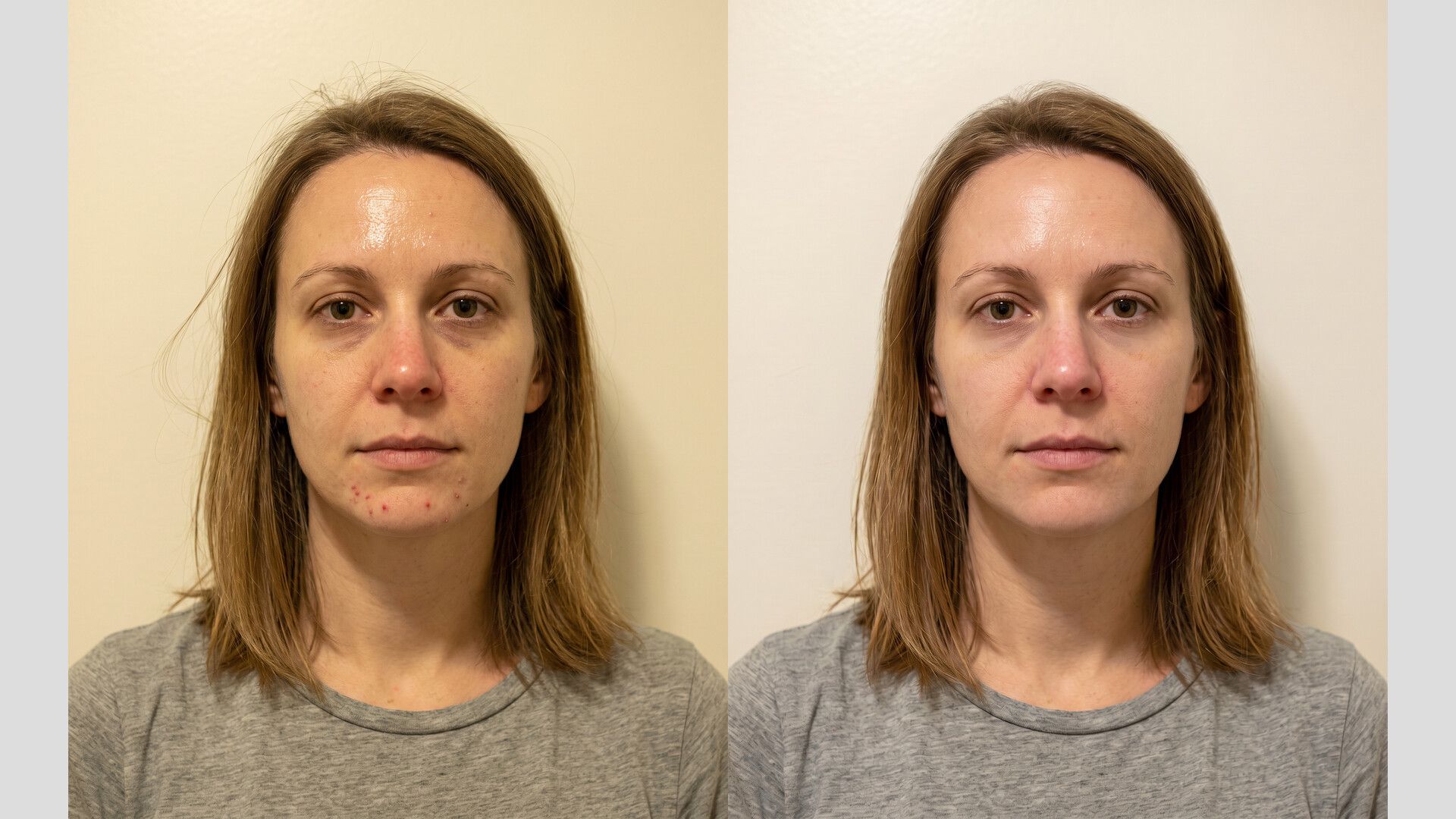
The source is a straight-out-of-camera portrait: small blemishes on the chin and forehead, under-eye shadows, redness around the nose, shine on the forehead, flyaway hairs and a yellow cast from a tungsten lamp. In Nano Banana Pro we listed every issue and, separately, what to keep:
Retouch this portrait naturally, like a professional photo retoucher:
remove the small red blemishes on the chin and forehead, soften the
under-eye shadows, even out the redness around the nose, reduce the oily
shine on the forehead, tame the flyaway hairs, and correct the yellow color
cast to a neutral daylight white balance. Keep the natural skin texture and
pores visible, do not smooth the skin into plastic. Keep the face shape,
eyes, nose, lips, expression, hairstyle, clothing, background, pose and
framing exactly the same.
The blemishes are gone, the under-eye shadows are softer, and the yellow cast gave way to neutral daylight — the wall got lighter with it. The face shape, eyes, expression and t-shirt didn’t change.
The close-up shows what matters most — the pores and the fine lines on the forehead stayed, and the skin didn’t turn plastic. To be honest about what didn’t work: the model reduced the forehead shine but didn’t remove it completely, and the tip of the nose stayed slightly pink. If you need more, run a second command: “Remove the remaining shine on the forehead and the pink tint on the nose tip. Keep everything else the same”.
Natural vs “magazine” retouch
We retouched the same source “like a beauty app”: smooth skin with no pores, whitened eyes and a glow.
Apply a heavy glossy beauty-app retouch to this portrait: very smooth
airbrushed skin with no pores, bright whitened eyes, slimmer face, enlarged
eyes, strong glow. Keep the face shape, eyes, nose, lips, expression,
hairstyle, clothing, background, pose and framing exactly the same.
The result is the classic app filter: the skin looks wet, the whites of the eyes are bleached, and the lashes got thicker even though we didn’t ask. The face shape barely changed: the model followed “keep the face shape” more than “slimmer face”. Some people like this for social media, but not for an ID or a résumé — a portrait like this gives the edit away instantly.
| Natural retouch | “Beauty filter” | |
|---|---|---|
| Pores and fine lines | kept | erased |
| Skin shine | reduced | stronger, the skin looks wet |
| Eyes | as in the photo | whitened, thicker lashes |
| Where to use it | résumé, documents, website, social media | social media only, if you like the style |
Retouch plus a studio backdrop: a headshot from a snapshot
You can combine the retouch with a new background and lighting to get a professional headshot for a résumé or a website.
Turn this snapshot into a clean professional headshot: natural skin retouch
that keeps pores, remove blemishes and shine, neat hair without flyaways,
neutral white balance, replace the background with a seamless light grey
studio backdrop and relight the face with soft even studio light. Keep the
face, identity, expression, hairstyle and grey t-shirt the same.
The background is now an even light grey, the light is soft studio light, the shine is gone completely and the hair is neat. The face and t-shirt are the same. More business portraits are in our AI headshot generator guide.
AI retouch prompts for different strengths
Swap in what you need. Always keep the closing “Keep …” line.
Light retouch (blemishes only).
Remove the small blemishes and the redness. Keep the natural skin texture,
pores and freckles. Keep everything else exactly the same.
Retouch that keeps freckles.
Retouch naturally: remove blemishes and under-eye shadows, but keep all the
freckles exactly as they are. Keep everything else the same.
Color and light correction.
Correct the white balance to neutral daylight, slightly brighten the face
and reduce harsh shadows. Do not change the skin or the face. Keep
everything else the same.
Men’s portrait retouch.
Natural men's retouch: remove blemishes and redness, reduce shine, keep the
stubble, pores and skin texture. Keep everything else exactly the same.
Teeth and eyes.
Slightly whiten the teeth and remove redness in the eyes, natural look,
not bright white. Keep everything else exactly the same.
Flyaways and stains on clothes.
Tame the flyaway hairs and remove the lint and small stains on the
sweater. Keep the face and everything else exactly the same.
AI vs manual retouching
| AI from a prompt | Manual retouch in an editor | |
|---|---|---|
| Time | about a minute | 15 minutes to an hour |
| Skill | none — you need a list of issues | frequency separation, dodge & burn |
| Control | step-by-step commands | pixel-level |
| Risk | the model may change extra things — check the face | overdoing the skin |
| Large prints | up to 4K | any resolution |
For social media, websites and résumés, AI is enough. For a magazine cover or a billboard, a retoucher is still more precise — and AI can do the first pass. Old and damaged photos are a separate job; see the AI photo restoration guide.
Limitations
- Likeness. The model redraws the frame, so compare the face with the source after retouching: the eyes, moles, nose shape.
- Leftover flaws. Shine and redness may not fully go on the first try — add a second command.
- Resolution. Nano Banana Pro outputs up to 4K. For large prints, upscale the shot as well — see the AI photo enhancer guide.
- Other people’s photos. Retouch your own shots or photos of people who don’t mind.
Bottom line
AI photo retouch takes a minute if you list the issues and separately ask to keep the pores and facial features. In our test the natural retouch removed blemishes, shadows and the yellow light and left the skin looking alive, while asking for a “beauty app” look gave gloss and bleached eyes — fine for social media only. For a résumé, combine the retouch with a studio backdrop in one prompt. Portrait retouching with Nano Banana Pro is available in the AI2Face generator, with the cost shown before each run; for any other photo edits, see the AI photo editor guide.
FAQ
How do I retouch a photo with AI?
Upload the photo to a model that edits images from text, such as Nano Banana Pro, and list what to remove: blemishes, under-eye shadows, redness, shine, a yellow cast. In a separate line, ask it to keep the pores and everything else unchanged.
How do I avoid plastic-looking skin?
Write “keep the natural skin texture and pores visible, do not smooth the skin into plastic” in the prompt. In our test the pores stayed with that line, while asking for “airbrushed skin” made the skin glossy and unnatural.
Can I retouch photos with AI for free?
Yes. AI2Face gives you welcome credits when you sign up — enough for several 2K retouches. The cost is shown before you start, and the service adds no watermark.
Will the face stay the same after retouching?
Yes, if you ask it to keep the features, expression, hairstyle, clothing and framing. In our test the face shape, eyes and expression didn't change in any of the three retouches.
Can I swap the background for a résumé photo at the same time?
Yes. Add “replace the background with a seamless light grey studio backdrop and relight the face with soft studio light” to the prompt — and an ordinary snapshot becomes a professional headshot.
Sources
2
- https://blog.google/innovation-and-ai/products/nano-banana-pro/
- https://ai.google.dev/gemini-api/docs/image-generation