AI text to speech used to sound like a train station announcement: flat, no pauses, random stress. The latest models read like a voice actor, with breaths, pauses at commas and a rising tone on questions. We voiced the same script in different voices and styles in the AI2Face generator. Listen to the samples below and repeat it in five steps.
What AI text to speech is
AI text to speech (TTS, speech synthesis) is a model that takes text and returns a voice recording. Unlike older synthesizers, it doesn’t stitch together recorded syllables. It generates the whole utterance and sets the pauses, pace and intonation from the meaning of the sentence.
In AI2Face, voiceover runs on Google’s Gemini TTS models. The main one is Gemini 3.8 Flash TTS, released on September 23, 2026. According to Google, it ranks first in the blind Hume AI Overall Quality Index, with the lighter 3.8 Flash-Lite TTS in second place. For a closer look at the models and how they differ, see our Gemini TTS guide.
| Feature | How it works in AI2Face |
|---|---|
| Voices | 30 ready-made voices: 14 female and 16 male |
| Languages | 130+ in Gemini 3.8 Flash TTS, detected from the text |
| Reading style | the How to read field: Calm, Announcer, Whisper or your own words |
| Dialog | Dialog mode: two voices, lines written as “Name: text” |
| Length | up to 5,000 characters per generation |
| File | mp3 in the generator feed, playable right on the tile |
How to turn text into speech online: 5 steps
- Open the Audio tab. In the AI2Face generator, switch the generation type to Audio, or pick Audio → Voice text in the header.
- Pick a model. Gemini 3.8 Flash TTS is the most expressive and understands a reading style. Gemini 3.8 Flash-Lite TTS costs less and suits large volumes.
- Pick the mode and a voice. In Single voice mode, one narrator reads the text. Each voice in the list shows its gender and character, such as “firm,” “upbeat” or “warm.” The ▶ button next to a voice plays a sample.
- Paste the text and set the style. Up to 5,000 characters, with the counter and price shown under the field. In How to read, choose a preset or describe the delivery in your own words.
- Press Generate. The recording appears in your feed within seconds: play it on the tile, or open it to seek and download.
Here’s the result with no style set — the voice Charon (“informative”), Gemini 3.8 Flash TTS:
No pause markup was needed: the model places pauses and intonation from periods, commas and dashes, so clean punctuation is the main setting of any voiceover. Which voice suits which job is covered in our roundup of AI voices for voiceover.
How to add emotion and intonation
Intonation comes from the How to read field, a short description of the delivery: emotion, pace, genre. Gemini 3.8 models understand it, and the description itself isn’t spoken. Here’s the same script in two different styles.
Style changes the pace as well as the mood. The same 204-character script runs 11.5 seconds with no style, 11.8 seconds as an ad and 14.8 seconds in the calm style. Keep that in mind if the voiceover has to fit a video.
How to write a style the model understands (based on Google’s documentation and the samples above):
- Name a genre, not just an emotion: “like a news anchor,” “like a bedtime story,” “like a movie trailer.” The model picks up the pace and pauses of the genre.
- Describe pace and volume in words: “unhurried,” “fast, in one breath,” “in a whisper.”
- One delivery per recording: if the mood has to change, split the text into two generations.
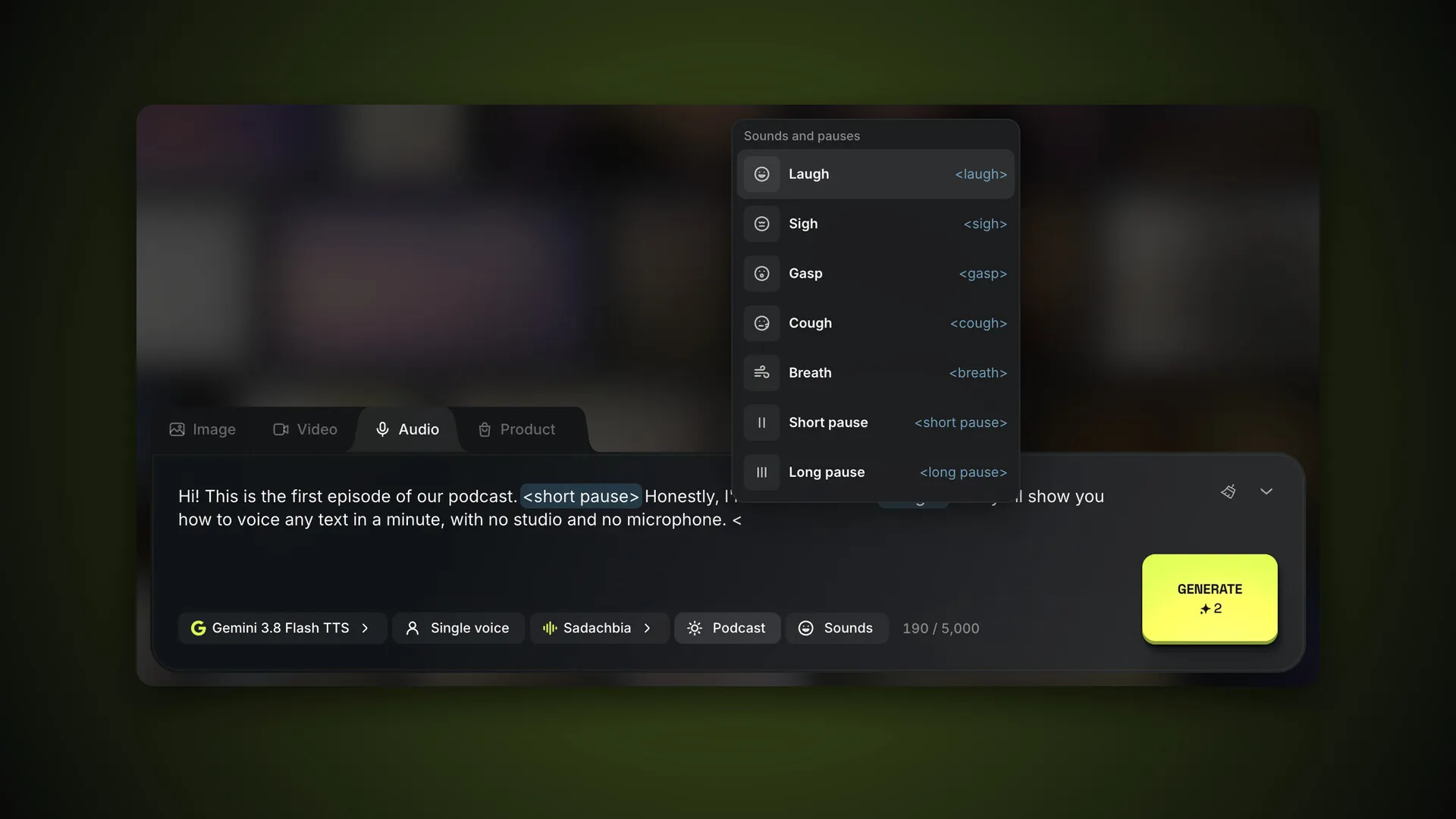
Short sounds and pauses go right into the text as tags: <laugh>, <sigh>, <short pause>, <long pause>. Gemini 3.8 models support them. We checked: the tag isn’t read aloud, it turns into a laugh or a pause. Tag examples are in the Gemini TTS guide. In AI2Face, you insert a tag with the Sounds button or by typing “<” right in the text — see the step-by-step text to speech guide for AI2Face.
Text to speech in English, Russian and 130+ languages
Gemini 3.8 Flash TTS supports more than 130 languages and detects the language from the text, so there’s no language setting. You don’t change the voice either: Kore sounds like the same person in English, Spanish or Russian.
To get names, numbers and abbreviations right:
- Spell out codes and SKUs: the model may read “A-17/3” in different ways; “A seventeen slash three” has only one reading.
- Check abbreviations and rare names by ear: if the stress or reading is wrong, write the word the way it sounds and generate again.
- Use punctuation for pauses: a dash or a period gives a clearer pause than a comma.
How to voice a long text
One AI2Face generation takes up to 5,000 characters, about five minutes of speech. The price is counted per started 1,000 characters and shown under the field before you run it. Voice long texts — a lecture, a book chapter, a script — in parts:
- Split by meaning: by paragraphs or chapters, not mid-sentence.
- Keep the same settings: the same model, voice and style in every part, so the joins aren’t audible.
- Join the files in any audio or video editor: every part comes as an mp3 in the same format.
Google allows up to 8,192 tokens of text per Gemini TTS request and roughly 655 seconds of audio out. The 5,000-character limit in AI2Face keeps each request inside those bounds, so the recording doesn’t cut off midway.
What AI voiceover is used for
| Use case | What gets voiced | Setup tip |
|---|---|---|
| YouTube, Reels, Shorts | a 30–60 second voiceover | an upbeat voice (Puck, Fenrir), style “like a host” |
| Ads | a tagline, an offer, a call to action | the Commercial preset, short sentences |
| Courses and training | lessons, instructions | an “informative” or “clear” voice, the Announcer preset |
| Audiobooks and stories | chapters of up to 5,000 characters | a soft voice, the Fairy tale preset or “mysterious” |
| Podcasts | two hosts talking | Dialog mode, the Podcast preset |
| Presentations, phone menus | short announcements | an even voice (Schedar), no style |
You can make the voice and the video in one generator: the voice in the Audio tab, the clip in the Video tab (video generation in AI2Face). To make a person in a photo speak, try a talking photo: the video model voices the line itself. Dialogs and character voices have their own guide — character voiceover. Three ways to voice a video — narration, a clip with built-in speech and dubbing — are covered with examples in AI video voiceover.
Is there free AI text to speech?
Free TTS sites usually limit one of three things: text length (a few hundred characters without sign-up), file downloads or commercial use. Many still run older synthesizers: on a short phrase the difference is small, on a minute of speech you hear it right away.
AI2Face gives you welcome credits when you sign up, enough for a few minutes of speech with Gemini 3.8 Flash TTS. That’s enough to compare voices on your own script before you pay. More on credits in AI2Face plans and credits. Paid and free voice models compared side by side are in our roundup of the best text-to-speech AI.
Where to try Gemini text to speech
All five Gemini TTS models are available in the AI2Face generator, next to image and video generation, so one subscription covers all three. The cost of each voiceover is shown before you generate, and credit packs don’t expire at the end of the month.
Bottom line
AI text to speech is ready for ads, video, courses and audiobooks. Start with Gemini 3.8 Flash TTS and a voice that fits the job: Charon or Kore for informational scripts, Puck for upbeat videos, Sulafat for gentle stories. If it sounds too flat, describe the delivery in How to read. If a word is stressed wrong, respell it. For a steady stream of similar texts, switch to Flash-Lite: it costs less and still follows the style. You still need a human voice actor when the brand depends on one recognizable voice or on hours of real acting.
FAQ
How do I turn text into speech online?
Open the Audio tab in the AI2Face generator, pick Single voice and a voice, paste up to 5,000 characters and press Generate. The mp3 shows up in your feed within seconds.
Can I use AI text to speech for free?
Yes, within your welcome credits: after you sign up for AI2Face they cover a few minutes of speech. Free TTS sites usually cap the text length, downloads or commercial use.
Which languages does it support?
Gemini 3.8 Flash TTS supports more than 130 languages and detects the language from the text. English and Russian are generally available (GA) in Google's documentation.
How much text can I voice at once?
Up to 5,000 characters per generation, which is about five minutes of speech. Voice a book or a long script in parts with the same voice and style.
Can I use the voiceover in ads and on YouTube?
Yes. AI2Face grants a commercial license for everything you create on any plan. Every Gemini TTS file carries a SynthID watermark: you can't hear it, but Google's detector can verify it.
Sources
4
- https://blog.google/innovation-and-ai/models-and-research/gemini-models/gemini-3-8-text-to-speech/
- https://aistudio.google.com/docs/speech-generation
- https://aistudio.google.com/docs/models/gemini-3.8-flash-tts
- https://docs.cloud.google.com/text-to-speech/docs/gemini-tts