What separates a realistic AI photo from an obviously generated one isn’t the model — it’s the prompt. From a short request the model draws an averaged picture: even light, smooth skin, a smile at the camera — the look of the stock photos it learned from. Describe the shot like a photographer — camera, lens, light and small imperfections — and you get a frame you can’t tell from a real one. We tested this on one scene and two models. Every image was made in the AI2Face generator, and the people in them are fictional.
Why AI photos look “AI”
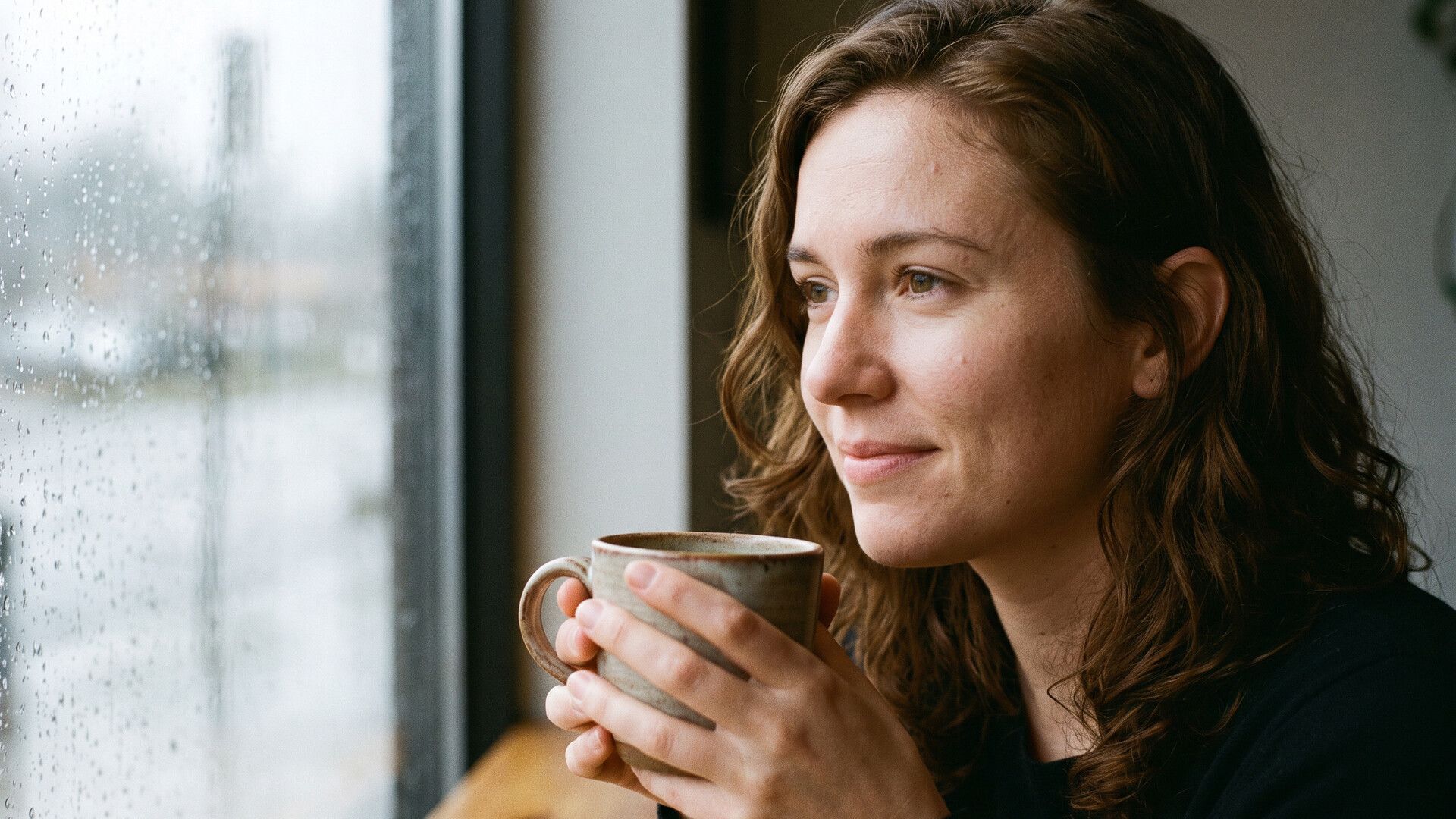
We gave Nano Banana Pro the same scene — a woman drinking coffee in a café — in two versions. On the left, a short prompt with the usual “realistic, high quality, 8k”. On the right, a photographer’s prompt with camera, light and skin texture (full text below).
A beautiful woman drinking coffee in a cafe, realistic, high quality, 8k
The short prompt produced a decent but stock-looking image: flat light from every side, everyone smiling, a photo-bank composition. The photographer’s prompt produced a lived-in shot: soft window light from one side, a shadow on the cheek, pores, flyaway hairs, film grain and raindrops on the glass. “8k” and “high quality” don’t add realism on their own.
The realistic AI photo prompt formula
Google’s Gemini image generation docs recommend describing photorealistic scenes in photographic terms: camera angle, lens, lighting. We turned that into seven blocks:
| Block | What to write | Example |
|---|---|---|
| Genre | what kind of photo | candid photo, street photo, overhead food photo |
| Who and where | the person, their look, the place, the time | a woman in her late twenties by a café window on a rainy afternoon |
| Action | what they’re doing at that moment | holding a cup with both hands, looking out the window |
| Camera | camera, lens, aperture, ISO | 35mm full-frame camera, 50mm lens at f/1.8 |
| Light | one source, its direction and quality | soft grey window light from the left as the single light source |
| Imperfections | texture and “accidents” | natural skin texture with pores, fine baby hairs, slight film grain |
| Color | grading or film stock | muted warm color grading |
The full photographer’s prompt from the comparison above:
Candid photo of an original fictional woman in her late twenties with wavy
chestnut hair tucked behind one ear, sitting by a large café window on a
rainy afternoon, holding a ceramic cup of cappuccino with both hands and
looking out the window, a faint smile. Shot on a 35mm full-frame camera,
50mm lens at f/1.8, shallow depth of field, soft grey window light from the
left as the single light source, gentle shadows on the right side of her
face, natural skin texture with pores and fine baby hairs, slight film
grain, muted warm color grading, raindrops on the glass in the foreground
slightly out of focus. No text, no logos.
The key phrase is “single light source”. A real photo is almost always lit from one side, and the shadows give it away. An AI frame without instructions is lit “from everywhere” — the first sign of AI.
What is the most realistic AI image generator
We sent the same photographer’s prompt to GPT Image 2.6. Nano Banana Pro is on the left, GPT Image 2.6 on the right.
Both models followed every block of the prompt: the window, the rain, the cup in both hands, soft light from the left. The character differs. Nano Banana Pro made a film-style shot: cool daylight, visible grain, pores and small skin irregularities. GPT Image 2.6 made a cinematic shot: warm grading, latte art, an earring, a lamp in the bokeh behind her — beautiful, but more staged.
| Task | Model |
|---|---|
| Documentary look, “shot on a phone or on film” | Nano Banana Pro |
| A realistic photo of you from a reference | Nano Banana Pro — keeps the likeness of up to 5 people |
| A cinematic frame, an ad, a cover | GPT Image 2.5 and 2.6 |
| A realistic scene with a sign, a label or lettering | GPT Image or Ideogram |
A realistic night street and food
The formula isn’t just for portraits. A night shot needs ISO and grain in the prompt — otherwise the model gives you a noise-free night that no real camera produces.
Street photo at night after rain in an old city: an original fictional
elderly man in a flat cap and a worn tweed coat waits at a tram stop under a
flickering street lamp, wet cobblestones reflecting warm orange and cool
cyan lights, a blurred tram passing behind him. Shot on a 28mm lens at f/2,
ISO 3200, visible fine grain, slight motion blur on the tram, natural deep
wrinkles and stubble on his face, documentary style, eye-level.
No readable text, no logos.
The tram’s motion blur, the grain and the two colors of light in the puddles make the frame documentary. The wrinkles and stubble are visible but not exaggerated.
For food, textures and a bit of mess matter: crumbs, a crumpled napkin, a hand in the frame.
Overhead food photo of a rustic breakfast on a weathered wooden table: a
cast-iron pan with two sunny-side-up eggs, crusty sourdough slices with
butter, a small bowl of cherry tomatoes, crumbs and a crumpled linen napkin,
a hand reaching for the bread at the edge of the frame. Soft morning
daylight from a window on the left, real food textures, slight
imperfections, shot on a 50mm lens. No text, no logos.
A hand at the edge of the frame and crumbs on the table are a food photographer’s trick: a perfectly clean table looks fake.
Signs of AI in a photo and how to remove them
| Sign | How to fix it in the prompt |
|---|---|
| Even light with no shadows | one source: “window light from the left as the single light source” |
| Plastic skin | “natural skin texture with pores”, “no retouching” |
| Everyone smiling at the camera | “candid”, “looking away”, a specific emotion |
| Perfect symmetry, subject dead center | angle and offset: “off-center composition”, “slightly tilted” |
| A night shot that’s too clean | ISO and grain: “ISO 3200, visible fine grain” |
| Extra fingers, merged objects | a simple hand action, fewer small objects in hand |
| Gibberish on signs | “No readable text” or the exact lettering |
If a finished shot has one small flaw — an extra finger, an odd earring — don’t regenerate it; fix it with one prompt, as shown in the AI photo editor guide. For large prints you can upscale the frame — see the AI photo enhancer guide.
A realistic AI photo of yourself
The same formula works with your own photo: upload a portrait as a reference and start the prompt with “the person from the photo, keep the face exactly as in the photo”. That’s how people do a realistic photoshoot without a photographer — ready-made scenes are in our AI photoshoot guide.
Bottom line
A realistic AI image generator delivers a real-looking photo when you describe it like a photographer: genre, camera and lens, a single light source, imperfections and color. “8K” and “ultra realistic” don’t do that job — in our test the short prompt produced a stock-looking picture. For a documentary, “shot on film” look use Nano Banana Pro; for a cinematic frame or an ad use GPT Image 2.6; for scenes with lettering use GPT Image or Ideogram. All three are available in the AI2Face generator, with the cost shown before each run.
FAQ
What is the most realistic AI image generator?
In our test Nano Banana Pro gave the most film-like, lived-in shot: pores, grain, soft window light. GPT Image 2.6 produced a cleaner, more cinematic frame. Both are photorealistic — choose by the look you want.
How do I write a prompt for a realistic AI photo?
Describe the shot, not the idea: who and where, what they're doing, the camera and lens, a single light source and its direction, imperfections (pores, flyaway hairs, grain) and the color grade. Words like “8K” and “ultra realistic” add almost nothing.
Can I make realistic AI photos for free?
Yes. AI2Face gives you welcome credits when you sign up — enough for several realistic 2K shots. The cost is shown before you start, and the service adds no watermark.
Why do AI photos look fake?
Usually because of even light from every direction, overly smooth skin, perfect symmetry and a stock-photo smile at the camera. All of that kicks in when the prompt has no shooting details.
Can I make a realistic AI photo of myself?
Yes. Upload your photo as a reference and describe the scene the same way as in this article. Nano Banana Pro keeps the likeness of up to 5 people in one frame.
Sources
4
- https://blog.google/innovation-and-ai/products/nano-banana-pro/
- https://ai.google.dev/gemini-api/docs/image-generation
- https://openai.com/index/introducing-images-2-6/
- https://developers.openai.com/api/docs/guides/image-prompting