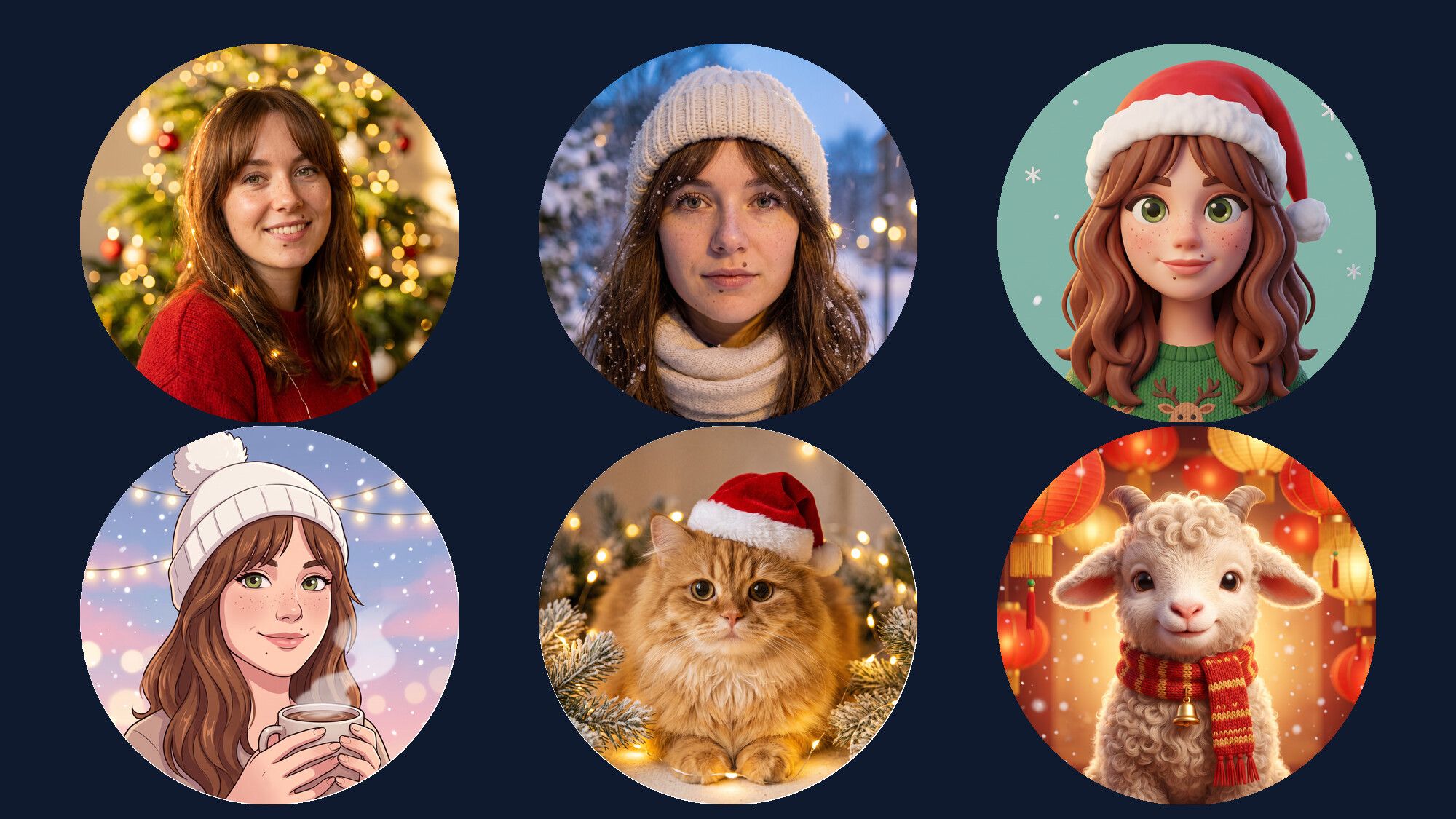
People usually look for Christmas profile pictures in galleries, but those are other people’s faces and clip art that thousands of others already use. AI makes a holiday avatar from your own photo: you upload a selfie and describe the look, and the model keeps your face while it paints a tree, snow or a 3D style around it. We took one ordinary selfie and turned it into five holiday avatars with Nano Banana Pro. Each came out right on the first run. Below you’ll find the prompt for each one, avatars without a photo and a matching pair.
1. How to make a Christmas profile picture from your photo in 4 steps
- Use a portrait with your face clearly visible. A selfie in daylight works, without sunglasses or shadows over your eyes. The background and clothes don’t matter: the model replaces them.
- Describe the holiday look. Name the setting (by the tree, outside in the snow), the clothes (a red sweater, a bobble hat) and the light (fairy lights, evening street lamps). Lighting makes the shot feel festive more than a Santa hat does.
- Ask the model to keep your face. Add a line asking it to keep your face exactly the same and list your features: face shape, eyes, haircut, freckles, moles. Without it, the model draws someone who looks similar but isn’t you.
- Frame it for a circle. Use a 1:1 square with your head and shoulders centered and room around your head. Almost every app shows profile pictures as circles and crops the corners.
We added the same ending to all five avatars made from the photo:
Keep her face exactly the same: face shape, eyes, chestnut hair with curtain bangs, freckles on her nose, small mole above her lip.
Head and shoulders centered in a square frame so it fits a circle crop, no text, no logos.
In its image model docs, Google recommends describing the scene in detail and passing a photo as a character reference. That’s exactly what we did: the selfie went into the model as the source, and the prompt only described the new look.
2. 5 Christmas avatar ideas from your photo, with prompts
All the avatars below are the same woman from one selfie. Each prompt starts with “Holiday avatar of the woman from the photo” and ends with the closing lines from the first section.
By the tree with fairy lights
The simplest and most recognizable look. Warm lights behind you set the holiday mood instantly, and your face stays the focus of the shot. This one is on the right in the image at the top of the article.
Holiday avatar of the woman from the photo: she stands in front of a decorated Christmas tree, warm fairy-light bokeh behind her,
a thin string of warm lights draped over her shoulder, red knit sweater, warm golden light on her face,
photorealistic, natural skin texture.
Snow on the eyelashes
A winter portrait without a tree or a Santa hat. It suits anyone who wants a holiday avatar they can keep until spring.
Winter portrait of the woman from the photo outdoors during gentle snowfall, snowflakes on her eyelashes and hair,
cream knit beanie and scarf, blue evening light with warm street lamps blurred behind,
photorealistic, natural skin texture.
3D cartoon avatar
A cartoon character in a Santa hat. The 3D style keeps the face recognizable and reads well in a tiny circle: big eyes and simple shapes stay visible even at 40 pixels.
3D cartoon avatar of the woman from the photo, stylized animated movie look, soft clay-like materials,
big expressive eyes, red Santa hat with white fur trim, green sweater with a reindeer pattern,
solid soft teal background with a few falling snowflakes.
Anime avatar
Anime Christmas profile pictures are among the most searched. Anime simplifies features, so the details in the closing lines matter even more here: people recognize you by your bangs and freckles even in a drawing.
Anime-style holiday avatar of the woman from the photo, clean modern anime illustration, cel shading,
white knit hat with a pom-pom, holding a cup of cocoa, soft pastel night sky with snowflakes and warm fairy lights.
Vintage Soviet New Year postcard
A 1960s retro postcard: faded colors, paper grain, spruce branches with glass ornaments. In Russia and much of Eastern Europe, these postcards were the classic New Year greeting, and the style stands out in any chat list.
Avatar of the woman from the photo in the style of a vintage Soviet New Year postcard, 1960s printed illustration,
slightly faded colors and paper grain, red coat with a white fur collar and a fur hat,
spruce branches with glass ornaments around her, deep blue starry background.
If you want more holiday looks in full frame rather than for a circle, take the prompts from our Christmas photoshoot ideas. There are 10 scenes from a single selfie, and you can crop any of them into an avatar.
3. Christmas profile pictures with cats and the 2027 zodiac sign
Not everyone wants their face on their profile picture. For an anonymous profile, a kid’s account or a work chat, avatars without a photo work well. Here the prompt describes the whole character, and you don’t need a reference.
With a cat. Christmas cat avatars are a perennial favorite. A ginger cat in a Santa hat among fairy lights:
Cute fluffy ginger cat wearing a small red Santa hat with white fur trim, sitting among glowing fairy lights
and pine branches, big round eyes, cozy warm light, photorealistic, head centered in a square frame,
no text, no logos.
The 2027 zodiac sign. In the Chinese calendar, 2027 is the Year of the Fire Goat. It begins on February 6, 2027, and red and gold make the festive palette:
Cute stylized 3D illustration of a little goat kid, symbol of the Year of the Fire Goat, wearing a red-and-gold
knitted scarf and a tiny golden bell, small horns, soft fur, warm red and gold palette, glowing paper lanterns
and snowflakes in the background, head centered in a square frame, no text, no logos.
A snowman. A neutral option for a work account: a cheerful 3D snowman in a striped scarf holding a sparkler.
4. Matching Christmas profile pictures
Matching avatars continue each other: one person holds the start of a string of lights, the other holds the end. If you make them separately, the details won’t line up: different light, different lights, a different street. It’s more reliable to generate one wide image and cut it in half.
- Generate a 16:9 image with two people at the edges facing each other, and a string of lights, a scarf or a ribbon running through the middle.
- Ask the model to put each face in the center of its half.
- Cut the image into two squares in any editor. The left half is one avatar, the right half is the other.
Wide photo split into two halves for a matching pair of profile pictures: on the left a young man with short dark hair
in a dark green sweater, on the right a young woman with long blonde hair in a red sweater. They stand facing each other
in a snowy evening street, and a single string of warm fairy lights runs from his hands on the left to her hands
on the right, continuing across both halves. Each face is centered in its own half, warm bokeh, photorealistic,
no text, no logos.
To make the matching avatars actually look like you, save yourself and your partner as characters and call both of them in the prompt with @Name tags. More ideas for two are in our couple photoshoot prompts.
5. Profile pictures for Instagram, WhatsApp, Telegram and Discord: format and circle
Instagram, WhatsApp, Telegram and Discord all show your profile picture as a circle. In a chat list that circle is only a few dozen pixels wide. So the same rules work everywhere:
- A 1:1 square. The apps crop and shrink the image themselves. Generate at 2K and you’ll have room for any size.
- Face centered with room to spare. The circle cuts off the corners. A pom-pom, horns or lights at the edge of the frame will disappear.
- Contrast between face and background. A dark face against a dark tree blurs together in a small circle. Fairy lights or a plain background fix that.
- Check it at 40 pixels. Shrink the avatar to the size of the icon in your chat list. If you can’t make out the face, remove small details from the prompt.
How to make an everyday, non-holiday avatar and which model keeps a face best across six styles is covered in our AI avatar guide. Ready prompts for different styles are in our profile picture prompts.
6. Where to make a Christmas avatar
Every avatar in this article was made in AI2Face with Nano Banana Pro. The generator also has other top image models, including GPT Image and Seedream. They’re all on one subscription, which costs less than paying for each one separately.
- Credits that don’t expire. Besides the subscription, there are credit packs, and you see the cost of each generation before you run it.
- Characters. Save yourself once from 2–4 photos and call yourself with an @Name tag in any prompt. Your face stays the same across every holiday avatar, card and photo.
- No “made with AI” label. AI2Face replaces the AI metadata in finished images with standard camera EXIF, so social networks don’t tag your avatar as AI-generated.
Bottom line
Your own Christmas profile picture made from your photo beats anything from a gallery: it’s your face, not a stranger’s, and nobody else has it. Start with the tree or snowfall looks: they’re the most reliable, and your face holds up best in them. If you want to stand out, go for 3D or the vintage postcard. For an anonymous profile, use the cat or the 2027 zodiac sign. For couples, generate one wide image and cut it in half instead of making two avatars separately. Before you set a new avatar, always check it in a small circle.
FAQ
How do I make a Christmas profile picture from my photo?
Upload a portrait with your face clearly visible and describe the holiday look: setting, clothes, lighting. Add a line asking the model to keep your face exactly the same, and ask for a square frame with your head centered. Then check the result in a small circle.
Which AI is best for Christmas avatars?
For avatars from a photo, Nano Banana Pro: it keeps facial features even in 3D and anime. Every avatar in this article was made with it in a single run, with no cherry-picking.
How do I make matching Christmas profile pictures?
Generate one wide 16:9 image with two people at the edges and a string of lights or a scarf running from one to the other. Cut it into two squares: each half becomes a profile picture, and together they continue each other.
What's the zodiac sign for 2027?
In the Chinese calendar, 2027 is the Year of the Fire Goat, starting on February 6, 2027. A goat kid in red and gold works well as a holiday avatar.
Can I make a Christmas avatar for free?
Yes, with starter credits. New AI2Face accounts get credits that cover several holiday avatars. You see the cost of each generation before you run it.
Sources
1
- https://ai.google.dev/gemini-api/docs/image-generation