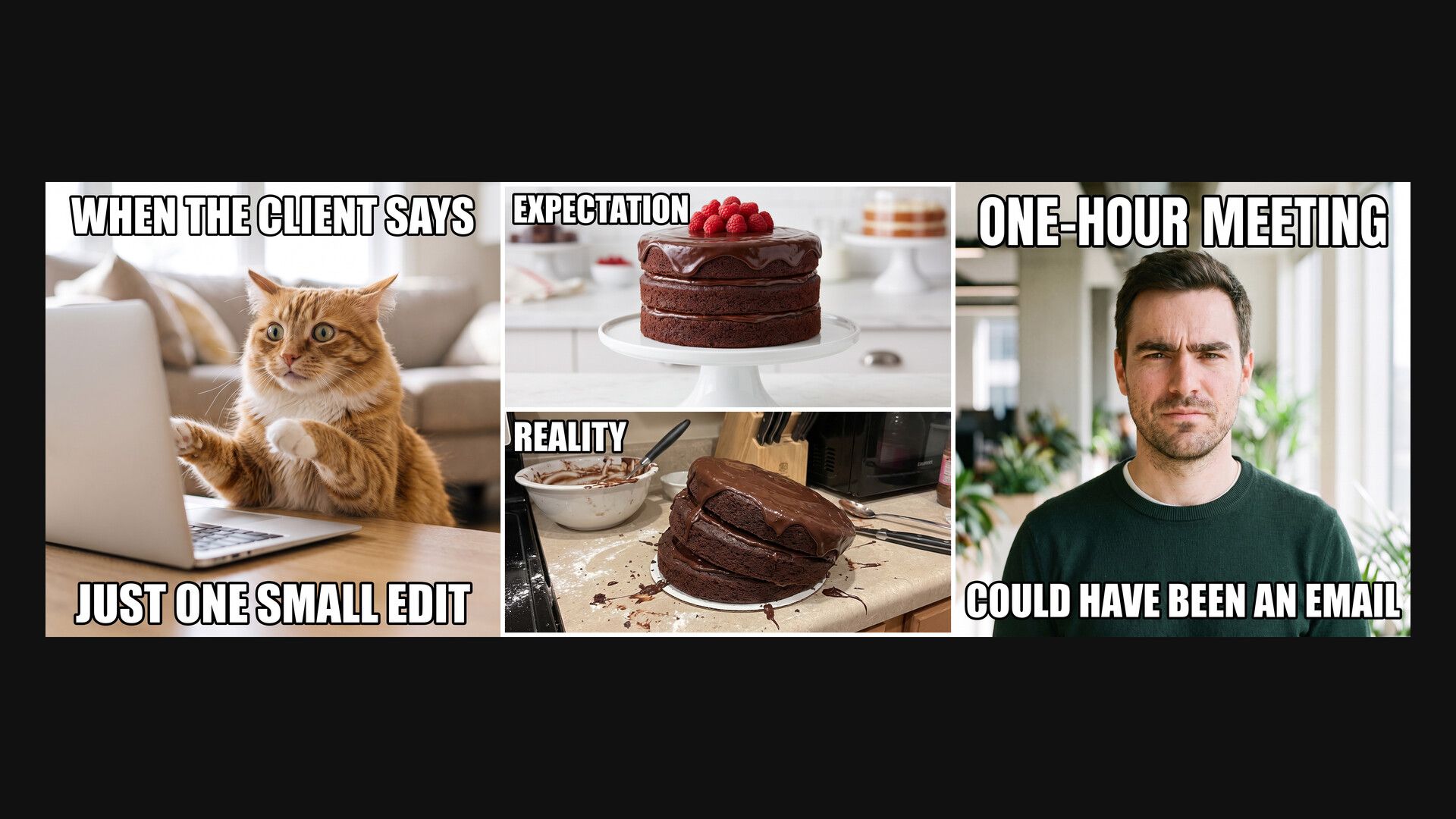
A meme is a picture plus a short caption, and it used to be a two-step job: find a photo, then add text in an editor. Today’s image models do both at once — they draw the scene and print the caption in that classic white font with a black outline. We tested three formats in Nano Banana Pro, each with an English and a Russian caption. All images were made in the AI2Face generator, and the cat and the people in them are fictional.
AI meme generator: which formats work
| Format | Input | What to write in the prompt |
|---|---|---|
| Classic meme: caption on top and bottom | text or a photo of the hero | the scene, the emotion and both captions |
| Two-panel: “expectation / reality”, “before / after” | text | what’s in each panel and the panel labels |
| Reaction meme from your own photo | your portrait | the same look, a new emotion and the caption |
| Video meme | a photo or text | the action, a line and the sound — in a video model |
One prompt gives you a finished meme — no separate editor, no image search. The model picks the font, the outline and where the text goes.
A captioned meme in one generation
For the first meme we took the ginger cat from our AI cat video article and sat it at a laptop with a shocked face. The cat photo is the reference; the scene and captions are in the prompt.
Classic image macro meme, square. The ginger tabby cat from the image sits at
a desk in front of an open plain silver laptop with no logo, seen from the
side, the cat has a shocked wide-eyed face, ears back, one paw raised. Bold
white Impact-style capital letters with a thick black outline, each caption
on a single line: at the top WHEN THE CLIENT SAYS and at the bottom JUST ONE
SMALL EDIT. Write the captions exactly, without quotation marks. Realistic
photo. No logos.
The first try wasn’t perfect. In the Russian version the model wrapped the long bottom caption onto a second line and broke a word in two. Three prompt changes fixed it: a shorter caption, the line “each caption on a single line” and “no extra spaces inside words”. The English version had clean text from the start but put a logo on the laptop lid — “plain silver laptop with no logo” removed it.
“Expectation vs reality” meme
The model builds two-panel memes on its own: describe each panel and the label in its corner.
Two-panel meme stacked vertically, square overall, a thin white divider
between panels. Top panel: a professional bakery photo of a perfect tall
three-layer chocolate cake with glossy ganache and fresh raspberries on a
white cake stand. Bottom panel: an amateur phone photo of the same cake made
at home, collapsed and leaning to one side, ganache dripping onto a messy
kitchen counter, flour everywhere. Each panel has a bold white Impact-style
label with a black outline in its top left corner: top panel EXPECTATION,
bottom panel REALITY. Write labels exactly, without quotation marks.
No logos.
The model nailed the “studio shot vs phone snapshot” contrast: even light and a white stand on top, warm kitchen light, flour and crumbs below. The labels landed in the top left corners, as asked.
A meme from your own photo
The most personal format is a reaction meme with your face. Upload a portrait as a reference and ask for the same person with a new emotion.
Make a reaction meme from this photo: the same man, same face, sweater and
office background, but now with an exaggerated skeptical expression — one
eyebrow raised high, lips pressed, eyes squinting at the camera. Square crop,
chest-up. Bold white Impact-style capital letters with a thick black outline,
each caption on a single line: at the top ONE-HOUR MEETING and at the bottom
COULD HAVE BEEN AN EMAIL. Write the captions exactly, without quotation
marks. No logos.
The face, stubble, sweater and office stayed the same — only the emotion changed. Memes with a friend or a coworker work the same way — with their permission.
How to write a meme caption
The model draws the caption, but you make it funny. A few rules that work:
- Keep it short: up to 5–6 words per line. The longer the caption, the higher the risk of a letter error.
- Setup on top, twist at the bottom: “When the client says” / “Just one small edit”.
- Shared pain: Mondays, deadlines, meetings, diets, renovations.
- No quotation marks in the prompt, or add “without quotation marks” — otherwise the model draws the quotes on the image.
- Caps and font: “bold white Impact-style capital letters with a thick black outline” — the classic meme look.
- Brainstorm jokes with a chatbot: “Give me 5 captions for a meme about a cat and client edits” — then pick the best.
AI meme prompts: 6 formats
Swap in your own captions for TOP TEXT and BOTTOM TEXT.
Dog boss.
Classic meme: a golden retriever in a tiny tie sits behind an office desk
like a strict boss, looking over its glasses. Caption on top: TOP TEXT,
at the bottom: BOTTOM TEXT. Bold white Impact-style letters, black outline.
Four levels of brain.
Vertical four-panel meme: each panel shows a glowing brain getting bigger
and brighter, from a small dim brain to a cosmic galaxy brain. Short white
caption to the left of each panel: LEVEL 1, LEVEL 2, LEVEL 3, LEVEL 4.
Monday vs Friday.
Two-panel meme side by side: left — a tired cat lying face down on a
keyboard, label MONDAY; right — the same cat in sunglasses dancing on the
desk, label FRIDAY. Bold white labels with black outline.
Reaction meme.
The person from the photo with a dramatic shocked face, hands on cheeks,
mouth wide open. Caption at the bottom: BOTTOM TEXT. Keep the face exactly
as in the photo.
Cartoon meme.
Simple flat cartoon meme: a small round character sits calmly at a desk
while the room behind him slowly fills with paperwork. Caption on top:
TOP TEXT. Thick outlines, flat colors.
Cat living a human life.
A grey cat in a bathrobe holds a coffee mug and stares out the window at the
rain with deep sadness. Caption at the bottom: BOTTOM TEXT. Realistic photo,
bold white meme letters.
For more ideas for funny pictures from your own photo, see our funny AI prompts; meme stickers for messengers are in the AI sticker maker guide.
Video memes
A meme can come alive: the Gemini Omni video model turns a picture into a short clip with sound. The cat at the laptop clutches its head, the cake collapses on camera, the reaction face slowly raises an eyebrow. A talking cat with the line “Breakfast was at seven” is in our AI cat video article.
Limitations
- Text errors. Even strong models sometimes break words — reread the caption before posting. Long captions break more often than short ones, especially in non-Latin scripts.
- Classic templates. The photos behind famous memes belong to their authors and often show real people. Make your own version with a fictional hero or your own photo.
- Real people. A meme of a recognizable public figure may violate their image rights. A meme of a friend — only with their consent.
- Logos. A laptop, mug or sneakers in the frame sometimes get a familiar logo — add “No logos”.
Bottom line
An AI meme generator does the whole job in one run: scene, emotion and caption in a single prompt, with no editor and no image search. Nano Banana Pro handles captions well, but keep them short and check every word. Your cat, your coworker or your own face become a meme from a photo reference, and a video model can turn the meme into a clip. Captioned memes are made in the AI2Face generator, with the cost shown before each run.
FAQ
How do I make a meme with AI?
Describe the scene and the captions in the prompt: “classic image macro meme, bold white Impact-style capital letters with a black outline, at the top … at the bottom …”. A model like Nano Banana Pro draws the picture and prints the text in one generation.
Can I make a meme from my own photo?
Yes. Upload the photo as a reference and ask for the same person with a new emotion and a caption. In our test a portrait became a reaction meme with a raised eyebrow, and the face and sweater stayed the same.
Does the AI get meme captions right?
Mostly, but check every word. All English captions came out clean; in a Russian version the model once split a long word in two. Short captions and the line “each caption on a single line” fixed it.
Can I make memes with AI for free?
Yes. AI2Face gives you welcome credits when you sign up — enough for several memes. The cost is shown before you start, and the service adds no watermark to the image.
Can I make a video meme?
Yes. A video model like Gemini Omni brings a meme to life: the cat talks, the cake collapses on camera. See the talking cat in our AI cat video article.
Sources
2
- https://blog.google/innovation-and-ai/products/nano-banana-pro/
- https://ai.google.dev/gemini-api/docs/image-generation