梗图是一张图加一句短配文。以前要分两步:先找照片,再在编辑器里加上文字。现在的图像模型一次做完:画出场景,并印上经典的白字黑边。我们在 Nano Banana Pro 里测了三种格式,每种都写了英文和俄文配文。所有图片都在 AI2Face 生成器里完成,猫和人都是虚构的。
AI梗图生成器:哪些格式能做
| 格式 | 输入 | 提示词里写什么 |
|---|---|---|
| 经典梗图:上下配文 | 文字,或主角的照片 | 场景、表情和上下两句配文 |
| 双格:“期待 / 现实”、“之前 / 之后” | 文字 | 每一格里有什么,以及格子上的标签 |
| 用自己的照片做反应梗图 | 你的人像照片 | 同一张脸、新的表情和配文 |
| 视频梗图 | 照片或文字 | 动作、一句台词和声音——用视频模型 |
一条提示词就得到成品梗图,不用另开编辑器,也不用去搜图。字体、描边和文字放在哪里,都由模型决定。
一次生成就带配文
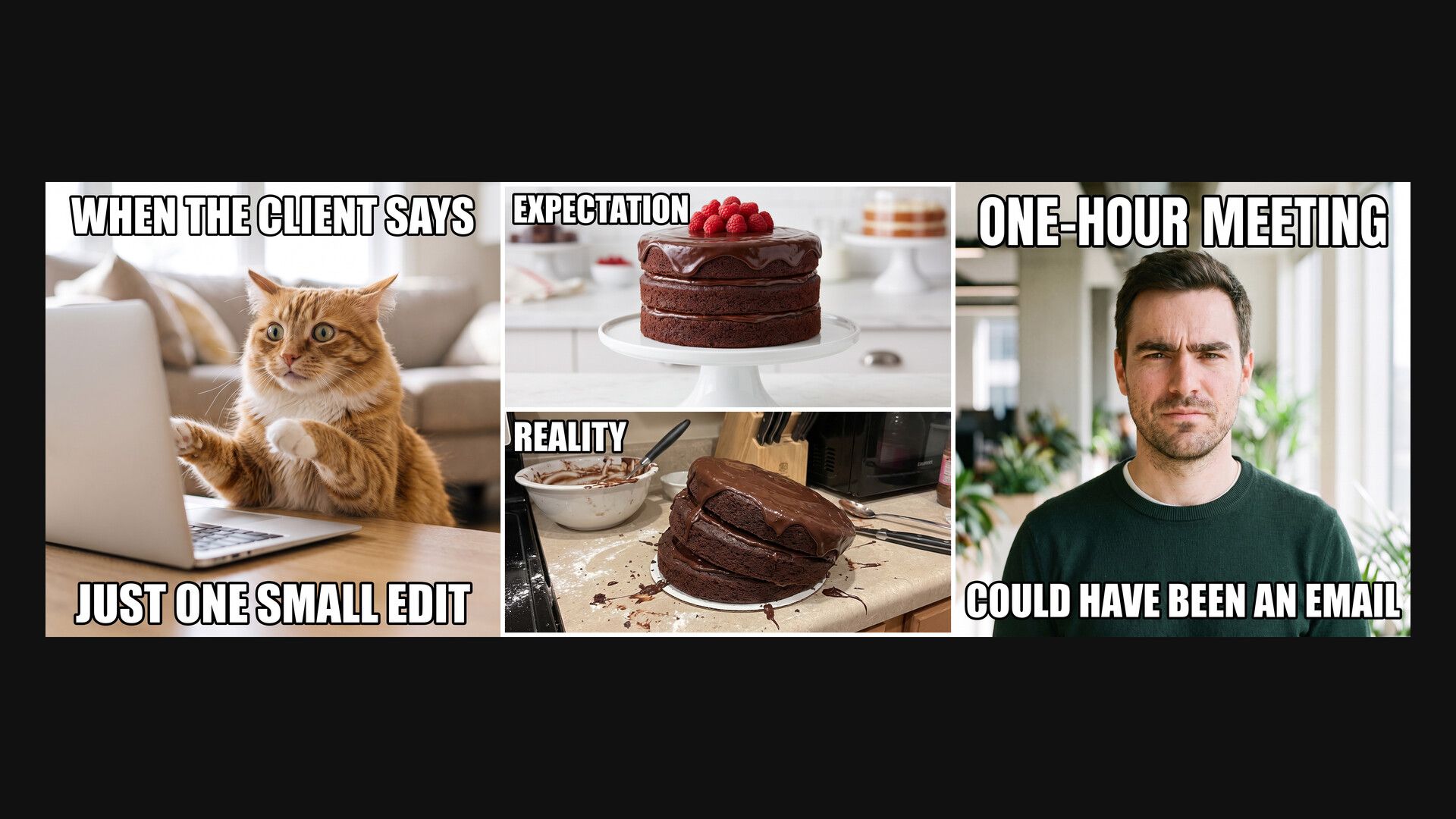
第一张梗图,我们用了AI猫咪视频里那只橘猫,让它坐在笔记本电脑前,一脸震惊。猫的照片是参考图,场景和配文写在提示词里。
Classic image macro meme, square. The ginger tabby cat from the image sits at
a desk in front of an open plain silver laptop with no logo, seen from the
side, the cat has a shocked wide-eyed face, ears back, one paw raised. Bold
white Impact-style capital letters with a thick black outline, each caption
on a single line: at the top WHEN THE CLIENT SAYS and at the bottom JUST ONE
SMALL EDIT. Write the captions exactly, without quotation marks. Realistic
photo. No logos.
第一次没完全做对。俄语版里,模型把下方那句长配文折到了第二行,还把一个词从中间拆开。改了三处就好了:把配文写短,加上“each caption on a single line”,以及“no extra spaces inside words”。英文版的文字从一开始就是对的,但笔记本盖上出现了一个标志;提示词里的“plain silver laptop with no logo”把它去掉了。
“期待与现实”梗图
双格梗图由模型自己排版:写清每一格里有什么,以及角落里的标签。
Two-panel meme stacked vertically, square overall, a thin white divider
between panels. Top panel: a professional bakery photo of a perfect tall
three-layer chocolate cake with glossy ganache and fresh raspberries on a
white cake stand. Bottom panel: an amateur phone photo of the same cake made
at home, collapsed and leaning to one side, ganache dripping onto a messy
kitchen counter, flour everywhere. Each panel has a bold white Impact-style
label with a black outline in its top left corner: top panel EXPECTATION,
bottom panel REALITY. Write labels exactly, without quotation marks.
No logos.
模型把“棚拍”和“手机随手拍”的差别做准了:上面光线均匀,蛋糕放在白色架子上;下面是暖色的厨房灯、面粉和碎屑。标签都在左上角,和提示词里写的一样。
用自己的照片做梗图
最贴近自己的做法,是用你的脸做一张反应梗图。把人像照片作为参考图上传,要求还是这个人,只换一个表情。
Make a reaction meme from this photo: the same man, same face, sweater and
office background, but now with an exaggerated skeptical expression — one
eyebrow raised high, lips pressed, eyes squinting at the camera. Square crop,
chest-up. Bold white Impact-style capital letters with a thick black outline,
each caption on a single line: at the top ONE-HOUR MEETING and at the bottom
COULD HAVE BEEN AN EMAIL. Write the captions exactly, without quotation
marks. No logos.
脸、胡茬、毛衣和办公室都留着,变的只有表情。朋友或同事的梗图也一样,先征得对方同意。
配文怎么写才好笑
配文由模型画到图上,好不好笑靠你来写。这几条比较管用:
- 写短: 每行最多 5–6 个词。配文越长,越容易写错字。
- 上面铺垫,下面反转: “When the client says” / “Just one small edit”。
- 写大家都有的槽点: 周一、截止日期、开会、节食、装修。
- 配文别加引号。 如果提示词里写了引号,就加上“without quotation marks”,否则模型会把引号画到图上。
- 大写和字体: 写上“bold white Impact-style capital letters with a thick black outline”,就是经典梗图的样子。
- 先用对话模型想笑话: “Give me 5 captions for a meme about a cat and client edits”,再挑最好的一句。
六种梗图提示词
把 TOP TEXT 和 BOTTOM TEXT 换成你自己的配文。
狗老板。
Classic meme: a golden retriever in a tiny tie sits behind an office desk
like a strict boss, looking over its glasses. Caption on top: TOP TEXT,
at the bottom: BOTTOM TEXT. Bold white Impact-style letters, black outline.
大脑的四个等级。
Vertical four-panel meme: each panel shows a glowing brain getting bigger
and brighter, from a small dim brain to a cosmic galaxy brain. Short white
caption to the left of each panel: LEVEL 1, LEVEL 2, LEVEL 3, LEVEL 4.
周一和周五。
Two-panel meme side by side: left — a tired cat lying face down on a
keyboard, label MONDAY; right — the same cat in sunglasses dancing on the
desk, label FRIDAY. Bold white labels with black outline.
反应梗图。
The person from the photo with a dramatic shocked face, hands on cheeks,
mouth wide open. Caption at the bottom: BOTTOM TEXT. Keep the face exactly
as in the photo.
卡通梗图。
Simple flat cartoon meme: a small round character sits calmly at a desk
while the room behind him slowly fills with paperwork. Caption on top:
TOP TEXT. Thick outlines, flat colors.
像人一样生活的猫。
A grey cat in a bathrobe holds a coffee mug and stares out the window at the
rain with deep sadness. Caption at the bottom: BOTTOM TEXT. Realistic photo,
bold white meme letters.
用自己的照片做更多搞笑图片,见搞笑AI图片提示词;聊天软件里的表情包贴纸,见AI做表情包贴纸。
视频梗图
梗图可以动起来。视频模型 Gemini Omni 能把一张图变成带声音的短片:笔记本电脑前的猫抱住头,蛋糕在镜头里塌掉,做反应的那个人慢慢挑起眉毛。会说“Breakfast was at seven”的猫,在AI猫咪视频一文里。
局限
- 文字会出错。 再强的模型有时也会把词拆开。发出去之前,把配文再读一遍。长配文比短配文更容易出错,拉丁字母以外的文字尤其如此。
- 经典模板。 著名梗图用的照片属于原作者,而且常常是真人。用虚构角色或你自己的照片,做你自己的版本。
- 真人。 用认得出的公众人物做梗图,可能侵犯肖像权。用朋友的脸,要先征得同意。
- 标志。 画面里的笔记本、杯子或运动鞋,有时会带上眼熟的标志。提示词里加上“No logos”。
总结
AI梗图生成器一次就能做完:场景、表情和配文写在同一条提示词里,编辑器和搜图这两步都省了。Nano Banana Pro 的配文大多写得对,但要写短,并核对每个字。你的猫、同事,或你自己的脸,都能靠一张参考照片变成梗图;视频模型还能把梗图做成短片。带配文的梗图在 AI2Face 生成器里做,每次开始前都会显示费用。
常见问题
怎样用AI做梗图?
在提示词里写清场景和配文:“classic image macro meme, bold white Impact-style capital letters with a black outline, at the top … at the bottom …”。像 Nano Banana Pro 这样的模型,一次生成就会画出画面,并把文字印上去。
能用我自己的照片做梗图吗?
能。把照片作为参考图上传,要求还是这个人,换一个新表情,再加上配文。在我们的测试里,一张人像照片变成了挑眉的反应梗图,脸和毛衣都没变。
AI的梗图配文写得准吗?
大多写得准,但每个字都要核对。测试里的英文配文全部正确;俄语版有一次把一个长词拆成了两截。配文写短,并加上“each caption on a single line”,就改好了。
可以免费用AI做梗图吗?
可以。注册 AI2Face 会得到欢迎积分,够做几张梗图。费用在开始前显示,图片上没有本服务的水印。
能做视频梗图吗?
能。像 Gemini Omni 这样的视频模型能让梗图动起来:猫开口说话,蛋糕在镜头里塌掉。会说话的猫,见我们的《AI猫咪视频》。
资料来源
2
- https://blog.google/innovation-and-ai/products/nano-banana-pro/
- https://ai.google.dev/gemini-api/docs/image-generation